Welcome to the Pycom forum Forum
    • \[\[global:header.categories\]\]
    • \[\[global:header.recent\]\]
    • \[\[global:header.tags\]\]
    • \[\[global:header.popular\]\]
    • Login
    1. Home
    2. Tags
    3. i2c

    Explore Pybytes | Official Documentation | Report a Firmware Bug/Issue | GitHub

    Log in to post

    • All categories
    • J

      external sensor program to pycom

      Watching Ignoring Scheduled Pinned Locked Moved Getting Started pycom i2c external sensor
      3
      0 Votes
      3 Posts
      684 Views
      J
      @jcaron as of right now what I want to achieve: Using a SCD30 sensor (which gets humidity, temperature and CO2 levels) read the data and save it, for that I intend to create (or modify based on other libraries) the library for the sensor. I already have the adress of the sensor and the hexadecimal "commands" and I am trying to use the libraries of the Pysense sensors as a template
    • B

      Import Custom Library

      Watching Ignoring Scheduled Pinned Locked Moved MicroPython i2c atom library import fipy
      3
      2
      0 Votes
      3 Posts
      859 Views
      B
      @dan I understand that and get this error when I flash it, but I would also like it to link in Atom so I can build and run it right away without having to flash it. [image: 1537809779016-2f6c007e-17d2-4496-a1eb-b82c77973113-image.png]
    • N

      Create Wireless sensor network interfacing BLE module and Gas sensors WIPY

      Watching Ignoring Scheduled Pinned Locked Moved Discussion sensor ble iot i2c
      2
      0 Votes
      2 Posts
      564 Views
      danD
      Hi @nobo23 Are you trying to connect multiple sensors to the WiPy and communicate with them via Bluetooth? Connecting multiple BLE nodes to the WiPy is possible. You can find our BLE examples here. Hope this helps, let me know if you have any questions!
    • V

      Wipy 2.0 and save data on my pc, not in flash memory

      Watching Ignoring Scheduled Pinned Locked Moved WiPy 2&3 wipy2.0 i2c pycom python saving data
      100
      0 Votes
      100 Posts
      28k Views
      robert-hhR
      @robert-hh said in Wipy 2.0 and save data on my pc, not in flash memory: Which BN055 module I was asking about the vendor and make of the BNO055 board.
    • N

      Confirm voltage criteria to use with wipy and I2C based digital barometer

      Watching Ignoring Scheduled Pinned Locked Moved Discussion i2c sensors wipy i2c wipy
      2
      0 Votes
      2 Posts
      534 Views
      robert-hhR
      @nobo23 Accirdoig to the datasheet, you can operate that device from the 3.3V output of the WiPy. That matches the signal levels of the I2C interface. Since the module has built-in pull-up resistors (if you install the jumpers), you do not have to add additional ones.
    • V

      Pin mapping for SPI / I2C connection to Cinterion TC65T module

      Watching Ignoring Scheduled Pinned Locked Moved LoPy i2c spi lopy4 tc65t
      1
      0 Votes
      1 Posts
      485 Views
      No one has replied
    • N

      I2C Slave Mode

      Watching Ignoring Scheduled Pinned Locked Moved Enhancements i2c slave mode feature
      1
      0 Votes
      1 Posts
      620 Views
      No one has replied
    • P

      fipy connecting to BME680 sensor

      Watching Ignoring Scheduled Pinned Locked Moved FiPy i2c bme680 fipy
      8
      0 Votes
      8 Posts
      2k Views
      P
      Later I realized I needed to download the pycom libraries in https://github.com/pycom/pycom-libraries. There was the mqtt lib and now it works. Isn't this supposed to be in the online documentation? Thank you.
    • J

      I2C 4-20ma Sensor Integration

      Watching Ignoring Scheduled Pinned Locked Moved LoPy i2c 4-20ma current 2-wire
      14
      0 Votes
      14 Posts
      2k Views
      T
      @jimpower Oh, didn't realize you had changed devices. So do you get a value equivalent to 4ma through the INA device (may need to be scaled) ? when not in the water ?
    • J

      INA219 Library Port Help

      Watching Ignoring Scheduled Pinned Locked Moved LoPy ina219 4-20ma i2c 2-wire
      2
      1
      0 Votes
      2 Posts
      663 Views
      J
      Here is the Library logging.py
    • N

      I2C Causes crashes on FiPy and WiPy

      Watching Ignoring Scheduled Pinned Locked Moved Discussion i2c wipy fipy
      4
      0 Votes
      4 Posts
      832 Views
      N
      I spoke too soon! >.< From a fresh wipe and firmware upgrade, I was able to run the I2C library. However, once I loaded my own modules onto the device and used them to connect to my network, calling "init" on an I2C instance caused the WiPy to freeze (connected over serial, but I could no longer type into the console). I built a bit-banged version of I2C yesterday and am able to use it on the same pins ("P8", "P9") without issue.
    • A

      I2C communication between sensor and Pysense not working

      Watching Ignoring Scheduled Pinned Locked Moved Comments & Feedback wipy 3.0 pysense i2c external sensor
      1
      0 Votes
      1 Posts
      560 Views
      No one has replied
    • N

      4-20mA sensors to interface with pycom sipy

      Watching Ignoring Scheduled Pinned Locked Moved Discussion pycomsipy 4-20ma sensor 4-20ma current i2c
      6
      0 Votes
      6 Posts
      1k Views
      sebS
      @noboz32 Do you mean just seeing what devices are connected to I2C? If so, please see the i2c.scan() function: https://docs.pycom.io/chapter/firmwareapi/pycom/machine/I2C.html#i2cscan
    • S

      Pin mappings between GPy and Expansion board 2.0

      Watching Ignoring Scheduled Pinned Locked Moved GPy gpy i2c
      3
      1 Votes
      3 Posts
      826 Views
      S
      That worked! Thank you..
    • B

      LoPy and custom PCB with L76-L GPS module

      Watching Ignoring Scheduled Pinned Locked Moved LoPy lopy gps quectel i2c i2c bus error
      11
      0 Votes
      11 Posts
      2k Views
      B
      @seb No luck with pull up resistors. There is also garbage when connected on P22/P21. PyTrack connected to the same pins with the same settings goes smooth. While connecting our L76-L there is no response on I2C ;-( only garbage response for i2c.scan(). Maybe you reconfigure L76-L chip through UART after mounting ? Will try to connect oscilloscope and/or logic analyzer
    • F

      Reading BNO055

      Watching Ignoring Scheduled Pinned Locked Moved WiPy 2&3 bno055 i2c i2c bus error
      13
      0 Votes
      13 Posts
      3k Views
      B
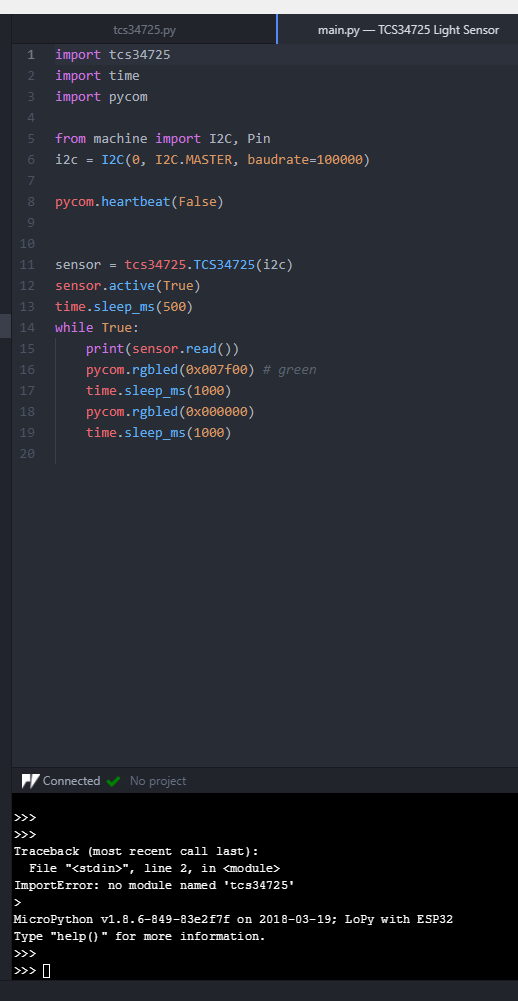
      @incognico said in Reading BNO055: Maybe try adding some lower value pullup resistors. From the FAQ page of your device BNO055 FAQ #4 "Depending on your system setup, you might need to adjust the pullups on the SCL and SDA lines to be a bit stronger. The BNO055 has very tight timing requirements on the I2C bus, requiring short setup and rise times on the signals. By default the breakout board has 10K pullups, which might be too weak on some setups." I had a similar problem. I'm not sure if it's been fixed or not, because I haven't tested it lately. Anyway, it had to do with I2C Clock Stretching. For me the solution was to set the I2C baud rate as low as it would go and work my way up until i found the fastest value that worked. Maybe give that a try, if you haven't already. =)
    • R

      LoPy4 i2c under Pins P13 to P18

      Watching Ignoring Scheduled Pinned Locked Moved LoPy i2c lopy4 pins
      8
      0 Votes
      8 Posts
      2k Views
      R
      @robert-hh Okay, understood. Will test and update here with my findings. Thank you again @robert-hh for your great great support!
    • O

      Pytrack and LoPy4 - I2C bus error

      Watching Ignoring Scheduled Pinned Locked Moved LoPy lopy4 i2c i2c bus error pytrack firmware
      8
      4
      0 Votes
      8 Posts
      2k Views
      sebS
      address 0x08 in the PIC microcontroller on the Pytrack/sense so it is supposed to be there. When I tested this out on a LoPy4 with the latest firmware and a Pytrack with the latest firmware it worked fine the first time. So are you completely unable to talk to the PIC without errors?
    • I

      Read unsigned byte from the specified register I2C

      Watching Ignoring Scheduled Pinned Locked Moved Comments & Feedback i2c si1145 typeerror
      2
      0 Votes
      2 Posts
      906 Views
      I
      Never mind I found the problem. It was actually in the line above paramVal = self._device.readfrom_mem(self._address, SI1145_REG_PARAMRD, 1)
    • L

      I2C at expansion board

      Watching Ignoring Scheduled Pinned Locked Moved Expansion Board i2c expansion board lopy
      8
      1
      0 Votes
      8 Posts
      2k Views
      ledbelly2142L
      @lopyusr I apologize, I misunderstood. I provided too much info on something not your issue. I'm assuming you are using this driver and example: HERE And documentation HERE
    • 1
    • 2
    • 3
    • 4
    • 2 / 4