• Wake on any RX

    LoPy lopy4 sleep power saving
    4
    0 Votes
    4 Posts
    593 Views
    J
    @hanssanitizer Leaving the LoRa radio in RX mode means the LoRa chip will be drawing a bit over 10 mA at all times. What are your constraints in terms of battery size and battery lifetime? A relatively large 2500 mAh will be emptied in 10 days in this scheme, not even counting what is drawn when the LoPy is awake, so probably less than a week overall, depending on how often it wakes up, for how long, and what it does. If that's something that is acceptable for you, then one could probably explore modifying the firmware to handle that, though my guess the complexity will arise from having to bypass all the LoRa chip initialisation on startup. Note that if that kind of power budget is acceptable, maybe just using the light sleep modes may be OK and probably much easier. For reference, the original LoPy uses the SX1272 while the LoPy4 uses the SX1276. I believe the FiPy uses the SX1276 as well.
  • 0 Votes
    3 Posts
    519 Views
    rcolisteteR
    @protonx Look at : microsd-power-consumption-on-expansion-board-pytrack-pysense-etc "Conclusions to save power during deep sleep with Expansion Board : it is important to use only TX/RX jumpers, or else we will have extra 0.06 mA; large voltage values implies some extra (e.g., 0.02) mA; avoid using uSD cards, because even just inserting a uSD card, not mounted, without open files before deep sleeping, there is an increase in deep sleep current, depending on the type of uSD, e. g., extra 0.21-0.24 mA for a 8GB uSD, extra 0.12-0.14 mA for a 32GB uSD."
  • 0 Votes
    7 Posts
    1k Views
    P
    Nevermind. It works now. The correct function is: lora.nvram_save() and lora.nvram_restore()
  • 2 Votes
    6 Posts
    1k Views
    P
    To anyone using the Bell Canada LTE Cat M1 network: just got word from them and it seems that at this point there is PSM support but: "eDRX feature is under consideration for future availability but there is no announced plan yet". I'll be playing with the +CPSMS AT command to see what's possible.
  • Ways to sleep Pytrack

    WiPy 2&3 sleep deepsleep wake up pytrack
    2
    3 Votes
    2 Posts
    1k Views
    J
    @alexpul if you want low power it’s going to be one of the last two. On a WiPy 3 the recommended option is machine.deepsleep, though I haven’t checked whether it can be used with wake-on-accelerometer. You probably won’t be able to capture the acceleration at the actual time it is over 3g, though, it takes a little while for the WiPy to wake up...
  • 0 Votes
    4 Posts
    1k Views
    A
    @jcaron I have a WiPy 3. What do you recommend using for deep sleep? And for the handler interrupt, do you know how to integrate it while the device is sleeping?
  • Wake-Up Via LoRa

    Discussion sleep lora lopy collision wake reason
    2
    0 Votes
    2 Posts
    910 Views
    J
    @burgeh It depends a lot, but generally (and specifically in your case), no. Listening for LoRa packets consumes power. The LoRa chip on the LoPy 4 (SX1276) uses 10 mA when listening, and the rest of the LoPy uses about 50 mA average. You could probably reduce the ESP32 power draw with some more or less advanced uses of sleep (i.e. not out of the box), but we're still talking tens of mA, compared to about 10-20 µA in deep sleep. This means that if you are listening all the time, even a relatively large 2500 mAh battery will only last a few days. This may or may not be a problem for you depending on the use case (mains powered, enormous battery, solar powered, ability to recharge/change battery often...), but this is usually not the kind of use case for LoRa, and from your question "more efficient power wise", it's clearly not what you are looking for. So it usually remains more power efficient to deep sleep, wake up on whatever event (time, pin change...), send the frame, check for an ACK, retry if no ACK was received, and go back to deep sleep. Note also that there are many other reasons than just another one of your nodes sending data that could trigger a frame being lost. The frequency bands are shared, so there will be other devices using them, and you will end up with collisions and other forms of noise even if you control when all of your devices send.

  • Deepsleep

    Getting Started sleep deep sleep wake up
    2
    0 Votes
    2 Posts
    628 Views
    A
    I have summarized my current understanding of the various was to enter sleep mode in this post. The general idea though is that sleep allows the board to still run (but with reduced power) and it does not reset when you exit sleep. Deep sleep resets the board (will not execute any code after the deep sleep command and will reboot and run boot.py and main.py)
  • machine.deepsleep does not 'reset'

    Getting Started deep sleep time sleep
    2
    0 Votes
    2 Posts
    596 Views
    V
    Hi, Have you fix it? I'm facing the same problem
  • 0 Votes
    6 Posts
    1k Views
    catalinC
    @fstaine WAKE_REASON_INT_PIN: can be generated from PIC_RC1(pin6 on External IO Header) https://docs.pycom.io/chapter/datasheets/boards/pytrack.html <later edit:> Please take a look here function pytrack.setup_int_pin_wake_up([rising_edge = True]).
  • ESP32 light sleep availability

    Discussion light sleep sleep power saving
    1
    0 Votes
    1 Posts
    779 Views
    No one has replied
  • 0 Votes
    9 Posts
    2k Views
    Charly86C
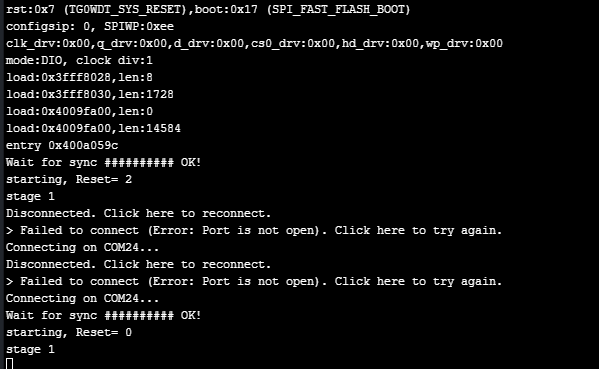
    @jcaron I think I got it The calibrate_rtc() in library pycoproc break the console output, if I comment this call from get_sleep_remaining() No problem Connecting on COM24... # OK! starting, Reset= 0 stage 1 stage 2 Wakeup reason: 4 ; Aproximate sleep remaining: calibrate_rtc 0 sec stage 4 Wait for update ............. may be the deal is out there def calibrate_rtc(self): # the 1.024 factor is because the PIC LF operates at 31 KHz # WDT has a frequency divider to generate 1 ms # and then there is a binary prescaler, e.g., 1, 2, 4 ... 512, 1024 ms # hence the need for the constant self._write(bytes([CMD_CALIBRATE]), wait=False) self.i2c.deinit() Pin('P21', mode=Pin.IN) pulses = pycom.pulses_get('P21', 100) self.i2c.init(mode=I2C.MASTER, pins=(self.sda, self.scl)) idx = 0
  • 0 Votes
    4 Posts
    1k Views
    J
    @fsergeys yes, we physically cut the header for that pin, so the only things that remain connected are the sensor and the PIC on the Pysense in our case. The LoPy was just bringing havoc when in deep sleep mode. You may want to experiment by using jumper cables between the WiPy and PyTrack at first, connecting everything but that pin, but I’m pretty sure you’ll get better results that way. Of course things would be very different with a WiPy 3, LoPy 4 or any of the other modules that implement deeep sleep directly rather than having to rely on an external board.
  • 0 Votes
    2 Posts
    1k Views
    sebS
    Hi, Yes, the way the Pytrack/Pysense/Deepsleep shield sleep works is that they disconnect the power from the module, sensors etc entirely. In the case of the Pysense and Pytrack the USB is also de-initialised meaning you will lose the serial connection, this can make talking to the device difficult if it does not wake up for long The Pytrack/Pysense/Deepsleep shield sleep is a a "deep" sleep rather than a regular sleep. Once you use this, when the module wakes up it will be like it was rebooted. Pycom board do not currently support machine.sleep although this is being investigated. The way this differs from the machine.deepsleep is that this uses external hardware and powers off everything on the board, not just the ESP32 processor. You can still use machine.deepsleep if you desire but note that on the WiPy2, LoPy and SiPy, due to an issue with the way the voltage regulator is connected the deepsleep current draw will be quite high (15mA) If you connect P12 to 3.3v with a jumper cable and wait for the device to wake from sleep you will see the on-board LED blink orange. Once this happens you can disconnect the cable. The device will now "safe boot". This prevents the device from running boot.py and main.py and therefore the code putting the device to sleep. The best way to stay informed of firmware updates is to use the forums subscribe feature for the announcements forum. We will always post in there when a new firmware is released
  • General LoPy + Pytrack Sleep Questions

    LoPy lopy sleep deepsleep pytrack python
    1
    0 Votes
    1 Posts
    749 Views
    No one has replied
  • Keeping state when awaking from sleep

    Discussion sleep state
    9
    0 Votes
    9 Posts
    2k Views
    M
    @jcaron thanks, I will keep improving the library.
  • 0 Votes
    7 Posts
    2k Views
    J
    You can get the wake reason using ds.get_wake_status(). I think the default is that there are no other wake-up sources configured, but you may try to disable_wake_on_fall(['P10','P17', 'P18']) and disable_wake_on_raise(['P10','P17', 'P18']) just to be sure. Full details here: https://docs.pycom.io/chapter/datasheets/boards/deepsleep/api.html
  • 0 Votes
    2 Posts
    942 Views
    L
    @meirssv you can save this info to sd card, flash or nvs
  • 0 Votes
    7 Posts
    2k Views
    D
    @ssetu No track ! Yesterday morning i find a black plastic envelope in my letter box !! Surprise ;-) I contibute to the 2 pycom kickstarter projects and i am still waiting for the FiPy.
  • Deep Sleep not working

    LoPy lopy pysense deep sleep sleep
    8
    0 Votes
    8 Posts
    3k Views
    Charly86C
    @dbrgn I'm having the same issue and I can reproduce it even with all latest firmware So to get back to your original question, is there a way to reset PIC with a Lopy GPIO, ie in case of I2C Error, reset the PIC should recover. Can we locate the PIC reset pin on the PySense/PyTrack boards? I would like to solder a wire from LoPy GPIO on it. It's difficult to tell our customers to recycle power on devices located in the field.