• deep sleep shield not working with low rise power supply

    deep sleep shield lopy
    1
    0 Votes
    1 Posts
    582 Views
    No one has replied
  • wipy 3: antenna setting not working

    antenna wipy3.0
    3
    0 Votes
    3 Posts
    831 Views
    F
    @seb Ok, Thank you for the prompt reply. Is there any easy way to find the know problems of a certain board and when it is sheduled to be fixed? Will there be an easy way to find the firmware file? I would be very helpfull if you could reply here if the new firmware is available and post a direct download link for the firmware file. So people who find this problem in the forum (because they might have the same issue) get the solution right away.
  • 0 Votes
    23 Posts
    8k Views
    L
    @robert-hh Yes, it looks like better choise. You could try if the figure changes if you add a smaller pull-up resistor, like 4k7 Ohm. I use already 4k7.
  • BLE does not read whole buffer data

    ble
    15
    0 Votes
    15 Posts
    3k Views
    L
    @jmarcelino I see that in public firmware it is now also avaiable :) (mac=b'\xd2lBk\xad\xc2', addr_type=1, adv_type=0, rssi=-83, data=b'\x02\x01\x06\x1b\xffW\x01\x00\xef\xbf\xc9\xac\xe7\xd5\xd0.\xe5\xf0\x8cr[\x8b[w\x03\xd2lBk\xad\xc2\n\tMI Band 2\x03\x02\xe0\xfe\x00\x00\x00\x00\x00\x00\x00\x00\x00\x00\x00\x00\x00\x00\x00\x00') {'NameShort': None, 'Flag': 6, 'Mac': b'd26c426badc2', 'NameComplete': b'4d492042616e642032', 'MfrData': b'570100efbfc9ace7d5d02ee5f08c725b8b5b7703d26c426badc2', 'Data': b'0201061bff570100efbfc9ace7d5d02ee5f08c725b8b5b7703d26c426badc20a094d492042616e6420320302e0fe00000000000000000000000000000000', 'Rssi': -83, 'Appearance': None} 'NameComplete': b'4d492042616e642032' import binascii a=b'4d492042616e642032' c=binascii.unhexlify(a) print(c) give me proper result :) 'MI Band 2'

  • Can't update firmware using update tool on Linux mint 18.2

    firmware update linux
    11
    0 Votes
    11 Posts
    3k Views
    N
    Hi @xykon thanks for the info and quick response :-) ... I've not really studied udev rules on my Linux mint machines. However adding dialout did not effect the behavior of 'cutecom'. Changing the read write permissions on the USB device survives reboot. I'm sure if I have a different device take USB0 then I will be stuck again. Any info on how files are copied to and from the device or is anyone in the community looking at a plugin for pycharm? Great stuff - keep up the good work... :-) Kind regards, Nicholas.
  • [SOLVED]No downlink

    ttn gateway gateway ttn downlink
    1
    0 Votes
    1 Posts
    918 Views
    No one has replied
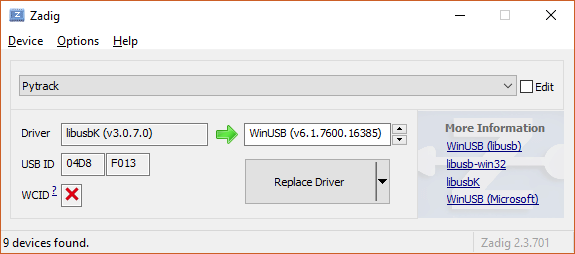
  • Pytrack shows up with alternative USB ID so dfu-util fails

    pytrack usb
    5
    1
    0 Votes
    5 Posts
    1k Views
    N
    I could not get this to work on Windows whatever I tried. Switched to Mac and dfu-util worked first time... Thanks - for anyone else reading this trail, forget Windows, try Mac :-)
  • can.recv() timeout wrong

    can canbus timeout
    3
    0 Votes
    3 Posts
    835 Views
    J
    Are you sure it is the documentation that is wrong? Isn´t it more natrual to specify timeout in ms?
  • [SOLVED] LoPy Firmware Update Failed

    lopy firmware
    10
    0 Votes
    10 Posts
    3k Views
    JVGDJ
    Thank you for your insight @xykon, I read your command and it came up to my mind. I wasn't using "sudo" and either I have a special group for handling serial connections in this computer. So you gave me the solution, I didn't add a dialout group but I just used sudo to run the app. Running one of the tools with sudo made the trick: $ sudo ./update Thank you again for your help. I will mark this thread as solved (if I can). Regards and have a great friday! Javier
  • 0 Votes
    6 Posts
    2k Views
    J
    That's correct, the ack will only be sent with the next uplink Where is a gotcha (at least it was to me): once the data is received, typically LoPy goes to deepsleep. Once it does, it forgets the previous session and starts the new one without confirmation. Indeed this was a problem, but from the upcoming firmware release on it won't - we now save the pending ack status of downlinks as well when using nvram_save(), so if you use nvram_restore after restarting from deepsleep the LoPy will know to send the acknowledgement with the next uplink. This is already in our internal code and will be public on the next release.
  • os.uname() causes core dump using firmware 1.1.12b on fopy

    fopy
    10
    0 Votes
    10 Posts
    2k Views
    M
    @robert-hh thanks :)
  • No connection to update-server

    firmware
    2
    0 Votes
    2 Posts
    722 Views
    L
    $ wget https://software.pycom.io/key=wipy.wipy with esp32&redirect=false&type=all [1] 8582 [2] 8583 $ --2018-01-07 09:41:37-- https://software.pycom.io/key=wipy.wipy with esp32 Auflösen des Hostnamens »software.pycom.io (software.pycom.io)« … 18.218.9.81 Verbindungsaufbau zu software.pycom.io (software.pycom.io)|18.218.9.81|:443 … verbunden. HTTP-Anforderung gesendet, auf Antwort wird gewartet … 404 Not Found 2018-01-07 09:41:39 FEHLER 404: Not Found.
  • HTTPS POST using urequests.py and Guru Mediation Error

    guru error
    7
    0 Votes
    7 Posts
    4k Views
    D
    @jimpower I think it should work ok with latest releases. However I did not test it for some time.
  • 0 Votes
    7 Posts
    2k Views
    J
    You can get the wake reason using ds.get_wake_status(). I think the default is that there are no other wake-up sources configured, but you may try to disable_wake_on_fall(['P10','P17', 'P18']) and disable_wake_on_raise(['P10','P17', 'P18']) just to be sure. Full details here: https://docs.pycom.io/chapter/datasheets/boards/deepsleep/api.html
  • pysense_0.0.8.dfu in Windows 7 x64

    pysense dfu
    1
    1 Votes
    1 Posts
    695 Views
    No one has replied
  • py.get_wake_reason not working fine

    deepsleep pysense
    1
    1 Votes
    1 Posts
    731 Views
    No one has replied
  • P12 on GPy and FiPy

    gpy fipy pin-out safeboot p12
    3
    2 Votes
    3 Posts
    1k Views
    robert-hhR
    @jmarcelino Hi Jose, thanks for the confirmation. What was the reason for moving away from GPIO16 for the antenna switch?
  • Core dump problem with firmware 1.10.1.b1 on lopy

    lopy coredump mqtt
    7
    0 Votes
    7 Posts
    2k Views
    A
    The same thing is happening when I replace the MQTT with the requests library and try to post to an HTTPS API. I believe the problem is th ussl.wrap_socket.
  • Nanogateway uplink fails after 30minutes every time.

    nanogateway wifi
    2
    0 Votes
    2 Posts
    753 Views
    J
    @dylan The nano gateway uses the Semtech standard protocol which is uses UDP on port 1700, this is very different from your usual WiFi traffic and likely to be treated differently by your institution’s network policies. I guess you can ask them what is their policy for long running UDP sessions on port 1700 but in my experience, unless you are able to talk to core networking staff, you might not get a straight answer. Since UDP is a connectionless protocol the LoPy has no idea about the state of the connection either, by definition UDP is a “send packets and hope for the best” protocol. What you can do is point the nanogateway at another server, maybe some server you control outside of your institution network and have something listen on UDP/1700 there, can be as simple as Netcat: netcat -u -l 1700 Then wait that half an hour and see if the nanogateway messages still arrive there. Doing a packet capture (tcpdump) on port 1700 will probably help. If the packets stop arriving - the gateway will always send status packets even without LoRa traffic - you’ll know at least that you have a networking problem and nothing related to LoRa. You should also monitor the nano gateway, ideally over Serial to see if no error messages pop up.
  • This topic is deleted!

    1
    0 Votes
    1 Posts
    15 Views
    No one has replied

Pycom on Twitter