• 0 Votes
    2 Posts
    1k Views
    A
    I got this to work on a different pc with windows 10, 32 bit installer of the the visual studio code (even though windows 10 install is a 64 bit install). 64 bit install of the visual studio code didnt work with the pymakr plugin for me.
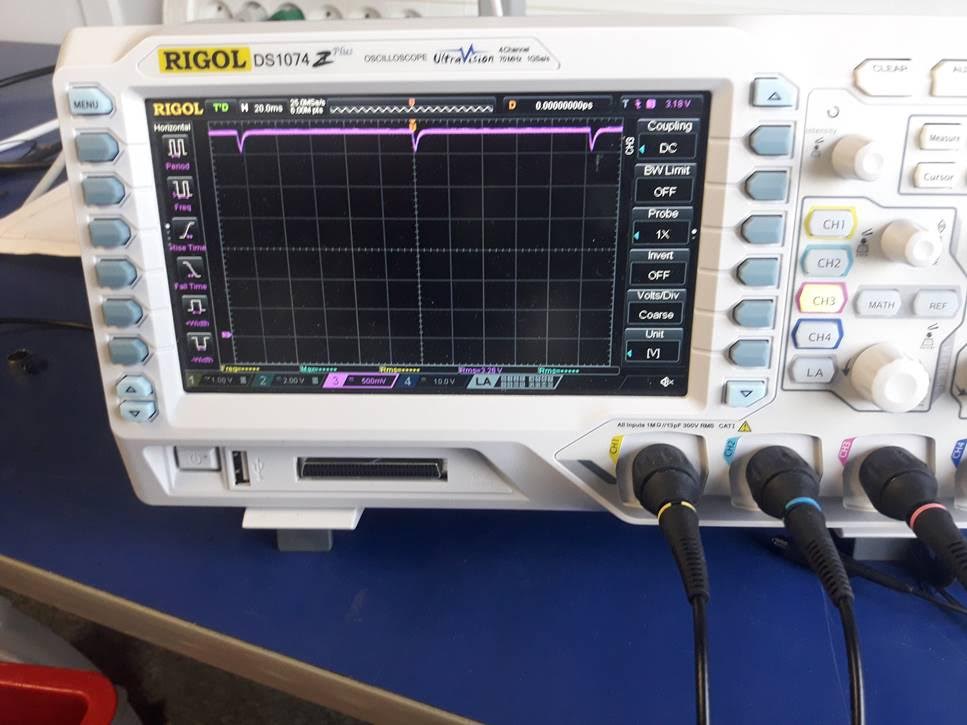
  • Reset pin low every 100ms

    sipy crash reset
    1
    1
    0 Votes
    1 Posts
    831 Views
    No one has replied
  • Crash after 1min 20sec

    sipy crash
    2
    0 Votes
    2 Posts
    931 Views
    L
    I looks like a re-flashing of the firmware fixed the issue.
  • [SOLVED] Sigfox message error on backend

    sipy sigfox
    3
    1
    0 Votes
    3 Posts
    1k Views
    L
    That worked like a charm! Thanks!
  • Crash on boot

    sipy crash
    5
    0 Votes
    5 Posts
    1k Views
    J
    @Lokefar said in Crash on boot: The device is powered by a 3.3V power supply. OK but make sure the the supply can deliver 500mA @ 3.3V. While the board doesn't use this much in normal use, the boot up is particularly demanding and the voltage can dip below what's necessary - for example during WiFi calibration. Most boot crashes are due to inadequate supply.
  • 0 Votes
    1 Posts
    930 Views
    No one has replied
  • DeepSleep current without the promised shield?

    sipy deepsleep
    1
    0 Votes
    1 Posts
    994 Views
    No one has replied
  • Problem with Sigfox Payload

    pytrack sipy sigfox
    21
    0 Votes
    21 Posts
    8k Views
    J
    @livius Hi livius, That's work!, now I need to understand how work the "format" of the "pack" function and specialy "little and big-endian. Best regards Jiemde
  • This topic is deleted!

    1
    0 Votes
    1 Posts
    10 Views
    No one has replied
  • This topic is deleted!

    1
    0 Votes
    1 Posts
    34 Views
    No one has replied
  • SiPy UART read with RS485 communication

    sipy uart communication arduino
    2
    0 Votes
    2 Posts
    1k Views
    B
    To enable reception you need to put your p_out to FALSE.
  • SiPy and Sigfox BTS... HELP.

    sipy sigfox bts
    8
    1
    0 Votes
    8 Posts
    2k Views
    N
    Hi @scg94 Sorry, I'm jumping late in this topic 1/ Did you manage to get this sorted ? 2/ If not, I assume you got this base station through a loan from Phaxsi Solutions ? Please send details to devrelations@sigfox.com so we can have a look 3/ In case you're unaware, Phaxsi is organising two developer events next week in Bogota & Medellin : makers.sigfox.com/tour
  • Expected battery life

    sipy battery sigfox
    1
    0 Votes
    1 Posts
    1k Views
    No one has replied
  • Updater Fails on all platforms

    sipy firmware sipy update
    3
    0 Votes
    3 Posts
    922 Views
    S
    Thanks for the super fast reply @robert-hh I am using bare board yes i can successfully connect to the device- in normal boot i get the python prompt, and with the jumper on GP23 i get "waiting for download" Pc is connected to the internet As above GPIO0 is tied to ground I have just solved the issue- i had selected the south african server in the menu, which failed. I now selected Europe (because it's also RCZ1) and this worked perfectly. Thanks again for the help!
  • SiPy and BME280

    bme280 sipy i2c i2c bus error
    6
    0 Votes
    6 Posts
    2k Views
    A
    @robert-hh said in SiPy and BME280: i2c = I2C(0, I2C.MASTER, pins=(Pin("G9"), Pin("G10"))) Thank you soooo much, correct syntax for me is: i2c = I2C(0, I2C.MASTER, pins=("G9", "G10")) and thanks @bucknall for the library ;)
  • Issues using Bluetooth with SiPy

    sipy sipy firmware bluetooth wifi
    7
    0 Votes
    7 Posts
    2k Views
    A
    @Jurassic-Pork @jmarcelino I tried it, and as far as I can see the result is the same.
  • SiPy FSK distance

    fks sipy sigfox
    1
    0 Votes
    1 Posts
    751 Views
    No one has replied
  • Running your program without CTRL-D from REPL

    repl
    1
    0 Votes
    1 Posts
    916 Views
    No one has replied
  • Sipy only send first message when restart

    rcz2 mexico first message
    12
    0 Votes
    12 Posts
    3k Views
    D
    Hello, First of all apologies for the long delay with this. We have solved this problem with the latest firmware (1.6.13.b1). The issue is a bit complex and it's not because of a firmware bug, it's more because of an undocumented characteristic of the Sigfox network in RCZ2 and RCZ4: There are 9 macro-channels with 2 micro-channels on each of of those 2 zones. However (and this is the undocumented part), only the first macro-channel is actually usable (for the time being). The Sigfox library itself behaves in a way that only the packets sent on the first macro-channel are transmitted properly (and the Sigfox library is a blackbox to anyone outside of Sigfox). The solution to this is to either call sigfox.reset() after every 2 transmissions and then wait 20s before transmitting again in order to comply with FCC regulations, or, as we have implemented it, handle this delay internally and only apply the amount of delay (if any) needed in order to comply. This latter approach is the one that we have preferred and therefore there's nothing to do at user code level besides knowing that more than 2 consecutive transmissions will have a delay in between. This is now documented in: https://docs.pycom.io/pycom_esp32/library/network.Sigfox.html This characteristics of the Sigfox network are not tested during the Sigfox certification phase and also not very well documented, which is why it took us so long to fix it. Cheers, Daniel
  • SiPy Sigfox Antenna link quality

    sigfox sipy
    15
    0 Votes
    15 Posts
    5k Views
    D
    Hello, First of all apologies for the long delay with this. We have solved this problem with the latest firmware (1.6.13.b1). The issue is a bit complex and it's not because of a firmware bug, it's more because of an undocumented characteristic of the Sigfox network in RCZ2 and RCZ4: There are 9 macro-channels with 2 micro-channels on each of of those 2 zones. However (and this is the undocumented part), only the first macro-channel is actually usable (for the time being). The Sigfox library itself behaves in a way that only the packets sent on the first macro-channel are transmitted properly (and the Sigfox library is a blackbox to anyone outside of Sigfox). The solution to this is to either call sigfox.reset() after every 2 transmissions and then wait 20s before transmitting again in order to comply with FCC regulations, or, as we have implemented it, handle this delay internally and only apply the amount of delay (if any) needed in order to comply. This latter approach is the one that we have preferred and therefore there's nothing to do at user code level besides knowing that more than 2 consecutive transmissions will have a delay in between. This is now documented in: https://docs.pycom.io/pycom_esp32/library/network.Sigfox.html This characteristics of the Sigfox network are not tested during the Sigfox certification phase and also not very well documented, which is why it took us so long to fix it. Cheers, Daniel

Pycom on Twitter
