• Fast FFT for IoT application

    Software Tools other
    2
    0 Votes
    2 Posts
    61 Views
    J
    @Garth-Paine You may want to check previous threads on the topic: https://forum.pycom.io/topic/4663/lopy4-fft-spectrum-analysis-micropython-adding-c-code https://forum.pycom.io/topic/6444/ulab-fft-spectrogram-performance-drops-for-8192-points-and-beyond See also: https://forum.pycom.io/topic/6234/pycom-firmwares-with-single-double-precision-and-ulab-module https://github.com/ph-robadel/ulab_samples#benchmark-of-fft-with-1024-points
  • 0 Votes
    5 Posts
    63 Views
    C
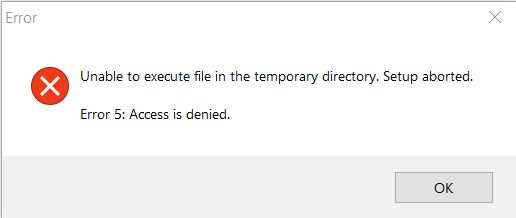
    @robert-hh Nope. De-install does not work either. But, as I expected, it was indeed all related to the 'Users\AppData\Local\Temp' folder. I have tried every suggestion I could find to unlock this folder, but nothing worked. Finally I just created a new C:\TEMP folder, and edited the Environment Variables so both TEMP and TMP pointed at that new folder. And now everything works. Not sure if this will create problems in the future, but for now I'm up and running again.
  • Pycom Firmwares double precision float

    Firmware esp32 other
    1
    1 Votes
    1 Posts
    63 Views
    No one has replied
  • Bulk programming

    Software Tools pymakr other
    3
    0 Votes
    3 Posts
    75 Views
    R
    You can try this technology https://itmaster-soft.com/en/angular-development-services
  • 0 Votes
    7 Posts
    122 Views
    B
    @randomrnti Just curious, which NB-IoT network would be that? Is it via PyCom Vodafone NB-IoT sim? or you have setup a MQTT Server on a dedicated server and made that server reachable from Vodafone NB-IoT SIM?
  • 0 Votes
    2 Posts
    66 Views
    C
    @nervencid said in Pymakr and VSCode 'sync_all_file_types' Configuration flag: Hello to all: I'm using VSCode with PyMakr, for upload NO .py files to flash memory, the folders are created fine However the files (extension .pem) are not uploaded. I find the 'sync_file_types' flag into 'settings.mddordle' file and i set it in true but doesn't have any effect (how can i setup this on VSCode?). In atom i switch this option to true in options panel and the files seems to be uploaded to the board properly. Can PyMakr extension of The VSCode work like atom one? Thank you and sorry for the English Where do I configure this in VSCode? I found the'sync file types' value in the'settings.md' file and set it to true, but nothing changed. After setting this preference to true in Atom's settings window, the files were successfully uploaded. Is the VSCode PyMakr add-on compatible with atom?
  • Frozen Code, the Docker way

    Firmware esp32 other
    2
    0 Votes
    2 Posts
    154 Views
    G
    @Thosch42 I'm working on this https://github.com/buzzware/pycom-docker-firmware-build I can't vouch for it being correct or the output being functional or running on Windows, but it does complete the build on my Mac.
  • Response.Output.Write()

    Software Tools other
    4
    0 Votes
    4 Posts
    454 Views
    robert-hhR
    @rohan123 Where did you find that string? It's not in the Micropython package.
  • Web service

    Software Tools other enhancement
    3
    -2 Votes
    3 Posts
    432 Views
    M
    a web service protocol stack is a protocol stack that is used to define,locate implement, and make web services interact with each other .
  • Debug with Visual Studio 2017

    Software Tools other
    2
    0 Votes
    2 Posts
    327 Views
    P
    Hi, We dont have any official support for debugging on Visual Studio. I suspect ptvsd also has significant native functionality to linux/windows and wont be easily ported to micropython either. Sorry I cant be more help
  • Problems with Pymakr in VS code

    Software Tools pymakr other bug
    9
    0 Votes
    9 Posts
    1k Views
    R
    @nervencid With autoconnect to false, it indeed tries to connect to the address 192.168.4.1, so the output you posted is as expected. To connect you can either: connect to the devices wifi and klik connect again, or: change the auto_connect setting to true, or: set the address setting to the correct comport (you can find it using the 'list serialports' command)
  • 1 Votes
    1 Posts
    540 Views
    No one has replied
  • Expansion 3 USB

    Software Tools other
    4
    0 Votes
    4 Posts
    650 Views
    J
    @pybuggz Have you checked for any moved jumpers or pressed buttons?
  • Problem Reset after upload

    Software Tools other
    2
    0 Votes
    2 Posts
    517 Views
    S
    @rodo said in [Problem Reset after uploadphrazle](/post/22837): Hi, I have a problem when I upload a project on my L01 via wifi reseting is actually failing, blue heartbeat is present, I tried machine.reset() too but still no reseting. I have to unplug manually the battery to reset it. I also observe that if I switch the connection to uart when the module is in this funky mood and try again machine.reset() it's working. Since my product is always connected to a battery is this a software problem ? Thanks While the blue heartbeat is there and I have tried using machine.reset(), I am unable to reset my L01 after uploading a project through wifi. The only way to get it to reset is to take the battery out by hand. When the module is acting up, I've found that switching the connection to uart and then trying machine.reset() again fixes the problem.
  • 1 Votes
    4 Posts
    729 Views
    A
    Hi @John-Baird I hope you (and I) find a satisfying environment to work with these devices. Another project I've come across since then is balena (which used to be called resin) https://www.balena.io/ It's a very cool project, with almost everything open source and which can be self hosted. I talked about my use case on their forum https://forums.balena.io/t/edge-node-manager-for-wipy-micropython/2549 and someone replied with this https://github.com/Bucknalla/resin-pycom-ota project which I haven't had the time yet to try out. The idea is that you have a device that acts as and "edge manager", that device runs balena and whenever you upload new code (git commit & push) the edge device will update your pycom devices.
  • 0 Votes
    3 Posts
    759 Views
    J
    Thank you! Worked on first try! Johan
  • Problem with SD Card in Pysense

    Firmware wipy other
    2
    0 Votes
    2 Posts
    548 Views
    robert-hhR
    @ghelbig The latest firmware release is 1.18.0.r1. Try to update first. Then try to reset the device after the card was inserted. That help sometimes. If not, try a different, maybe smaller card.
  • Firmware upgrade of pytrack removes USB

    Firmware other
    4
    0 Votes
    4 Posts
    903 Views
    Z
    Hi @catalin Yes, I did follow these instructions. I did just that, and the usb device does not show. I also tried to repeat the dfu-util command with no success. I don't know if the hardware or is faulty (did not ls /dev or lsusb before updating the firmware to ensure that the hardware work). However, dfu-util does not work when the pytrack isn't connected, but it works when it is connected, as you would expect. I buggles my mind, how you can flash something that lsusb doesn't acknowledge. Do you have any suggestions? Best regards Frederik
  • OEM L01 module firmware

    Firmware lopy other
    2
    0 Votes
    2 Posts
    593 Views
    J
    @andreas-bruring For the L01 you should use the LoPy1 firmware, the firmware then detects the expanded RAM.
