• How to make sense of gps data sent to sigfox

    SiPy gps sipy lopy sigfox
    4
    1
    0 Votes
    4 Posts
    1k Views
    E
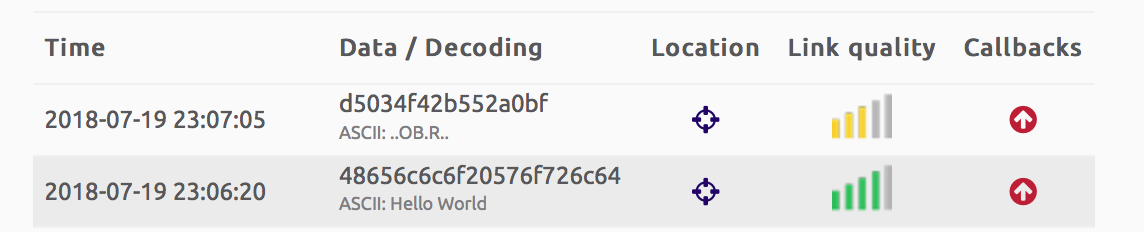
    @james-matthews struct.unpack work with "byte" objet. As we have to unpack a float this "byte" object must have a size of 4 bytes. [https://docs.python.org/2/library/struct.html] This float , have been packed in a binary form '''s.send(struct.pack('f',float(latitude)) + struct.pack('f',float(longitude)))''' then sent to sigfox backend data and showed in hexadecimal '''d5034f42b552a0bf''' so, to have original value you just have to unpack it from hexadecimal to float ''' lat=b'\xd5\x03\x4f\x42' '''this is the way to create and assign hexadecimal value to a 'python byte object' with len=4
  • Azure IOT hub Pycom

    LoPy azure sipy lopy fipy
    7
    0 Votes
    7 Posts
    2k Views
    C
    What is the interest level in an MP implementation? There are many things to be taken care of besides just the Hub connection (DPS, Twin, etc).
  • FLashing firmware on SIPY not working

    SiPy sipy update
    2
    0 Votes
    2 Posts
    515 Views
    danD
    Hi @Colateral, Did you select pybytes as "Type"? If you select stable, it won't ask for a token. Let me know if this helped
  • Italy activation

    SiPy sipy nettrotter sigfox activation
    1
    0 Votes
    1 Posts
    438 Views
    No one has replied
  • 0 Votes
    3 Posts
    978 Views
    S
    @freddy I have some Pysense code to send almost all of it over LoRa. Might be useful as a starting point. It is on GitHub at https://github.com/smbunn/FiPy in the python program 'sense.py' and the latest copy is pasted below. # See https://docs.pycom.io for more information regarding library specifics from network import LoRa #import config from pysense import Pysense from LIS2HH12 import LIS2HH12 from SI7006A20 import SI7006A20 from LTR329ALS01 import LTR329ALS01 from MPL3115A2 import MPL3115A2,ALTITUDE,PRESSURE import time # import library for delay times import pycom import socket import binascii import struct import ujson # Colors off = 0x000000 red = 0xff0000 green = 0x00ff00 blue = 0x0000ff yellow = 0xffff00 # Initialize LoRa in LORAWAN mode. lora = LoRa(mode=LoRa.LORAWAN) # Set up KotahiNet channels lora.add_channel(0, frequency=864862500, dr_min=0, dr_max=5) lora.add_channel(1, frequency=865062500, dr_min=0, dr_max=5) lora.add_channel(2, frequency=865402500, dr_min=0, dr_max=5) lora.add_channel(3, frequency=865602500, dr_min=0, dr_max=5) lora.add_channel(4, frequency=865985000, dr_min=0, dr_max=5) lora.add_channel(5, frequency=866200000, dr_min=0, dr_max=5) lora.add_channel(6, frequency=866400000, dr_min=0, dr_max=5) lora.add_channel(7, frequency=866600000, dr_min=0, dr_max=5) # Turn off hearbeat LED pycom.heartbeat(False) # create an ABP authentication params dev_addr = struct.unpack(">l", binascii.unhexlify('00 70 C3 4D'.replace(' ','')))[0] nwk_swkey = binascii.unhexlify('1BFE9C81AD35B39019244D155CE31D88'.replace(' ','')) app_swkey = binascii.unhexlify('045ABBEFE974D3E257AC31522E8E837B'.replace(' ','')) # join a network using ABP (Activation By Personalization) lora.join(activation=LoRa.ABP, auth=(dev_addr, nwk_swkey, app_swkey)) # create a LoRa socket s = socket.socket(socket.AF_LORA, socket.SOCK_RAW) # set the LoRaWAN data rate s.setsockopt(socket.SOL_LORA, socket.SO_DR, 0) # Builds the bytearray to send the request py = Pysense() si = SI7006A20(py) lt = LTR329ALS01(py) li = LIS2HH12(py) for count in range (2000): print("Count=", count) vt = py.read_battery_voltage() print("Battery voltage: " +str(vt)) dew = si.dew_point() print("Dew point: "+ str(dew) + " deg C") mp = MPL3115A2(py,mode=ALTITUDE) # Returns height in meters. Mode may also be set to PRESSURE, returning a value in Pascals print("MPL3115A2 temperature: " + str(mp.temperature())) temp1 = mp.temperature() alt1 = mp.altitude()+100.0 print("Altitude: " + str(alt1)) mpp = MPL3115A2(py,mode=PRESSURE) # Returns pressure in Pa. Mode may also be set to ALTITUDE, returning a value in meters press1 = mpp.pressure() print("Pressure: " + str(press1)) #Pressure does not work too well temp2 = si.temperature() hum1 = si.humidity() print("Temperature: " + str(temp2)+ " deg C and Relative Humidity: " + str(hum1) + " %RH") t_ambient = 24.4 relhum = si.humid_ambient(t_ambient) print("Humidity Ambient for " + str(t_ambient) + " deg C is " + str(relhum) + "%RH") print("Light (channel Blue lux, channel Red lux): " + str(lt.light())) acct = li.acceleration() acc1 = acct[0] acc2 = acct[1] acc3 = acct[2] roll1 = li.roll() pitch1 = li.pitch() print("Acceleration: " + str(acc1)) print("Roll: " + str(roll1)) print("Pitch: " + str(pitch1)) # Flash the light every time a payload is sent pycom.rgbled(blue) time.sleep(0.5) pycom.rgbled(off) time.sleep(0.5) pycom.rgbled(red) time.sleep(0.5) pycom.rgbled(off) data = bytearray(48) data[0:4] = bytearray(struct.pack(">i", count)) data[4:8] = bytearray(struct.pack(">f", vt)) data[8:12] = bytearray(struct.pack(">f", dew)) data[12:16] = bytearray(struct.pack(">f", temp1)) data[16:20] = bytearray(struct.pack(">f", alt1)) data[20:24] = bytearray(struct.pack(">f", press1)) data[24:28] = bytearray(struct.pack(">f", temp2)) data[28:32] = bytearray(struct.pack(">f", hum1)) data[32:36] = bytearray(struct.pack(">f", relhum)) data[36:40] = bytearray(struct.pack(">f", acc1)) data[40:44] = bytearray(struct.pack(">f", acc2)) data[44:48] = bytearray(struct.pack(">f", acc3)) # data[48:52] = bytearray(struct.pack(">f", roll1)) # data[52:56] = bytearray(struct.pack(">f", pitch1)) print ('Data = ',count,vt,dew, temp1, alt1, press1, temp2, hum1, relhum, acc1, acc2, acc3, roll1, pitch1 ) s.setblocking(True) s.send(data) # send buffer to AWS print('data sent') time.sleep(0.5) # get any data received& s.setblocking(False) data = s.recv(64) time.sleep(0.5) print(data) #anything received?time.sleep(20) # wait time between packets sent time.sleep(59) Note : I had to comment out the last two float values for roll and pitch as you are limited to 51 bytes when using SF12. The Git Hub has my Node--Red implementation which decodes the payload. Simon
  • 0 Votes
    3 Posts
    783 Views
    N
    Actually I wanted to make home automation project in which I wanted to start and stop Fan wireless by interfacing Pycom and Xbee S2C module with Xbee S2C I am connecting ADC with Digital pressure sensor which help me to send the data to pycom device
  • 0 Votes
    3 Posts
    920 Views
    mfalkviddM
    @catalin This is a promotion for NCD store, camouflaged as a question. See https://goo.gl/J9jZ6U for a list of similar questions. And see the user's profile, everything they've posted contains a link to the NCD store. https://forum.pycom.io/user/jhonrob92?_=1533136634032&loggedin=true
  • 0 Votes
    2 Posts
    705 Views
    nespressifN
    Sorry, I guess I can still send data until 2020, even if the subscription is for 12 months, right? What is the difference between the duration of the subscription and Communication end date? Start date: 2018-04-23 Activation end date: 2019-04-23 Communication end date: 2020-04-22 Timezone: UTC Contract links See on BUY Subscription Uplinks: 140 Downlinks: 4 Subscription duration: 12 month(s) Maximum devices: 1 Subscriptions in use: 1 Subscriptions used: 0
  • Deepsleep and Power Bank

    Expansion Board sipy deep sleep power down power saving
    4
    0 Votes
    4 Posts
    902 Views
    L
    @toppert Some of power banks can support low current mode. Some of tem must be turned in this mode by special press on the button, some work from the start. But many do not support low current mode at all. E.g. "Mi" power banks support this mode - but as @seb say already it is super inefficient. You can got longer time from battery then from powerbanks.
  • SiPy hardware integration.

    SiPy sipy deep sleep power battery hardware
    7
    0 Votes
    7 Posts
    1k Views
    G
    Sorry, I misunderstood. I can only tell you that the Pygate mounting hole spacing is the same as the Expansionboard 3.0's spacing. We provide that here: https://docs.pycom.io/gitbook/assets/specsheets/Pycom_002_Specsheets_Pygate_v1.pdf in section 12. I will work on getting the Expansionboard spacing out there on its own page!
  • 0 Votes
    1 Posts
    742 Views
    No one has replied
  • 1 Votes
    1 Posts
    647 Views
    No one has replied
  • Sipy overheating

    Comments & Feedback sipy help hot
    4
    0 Votes
    4 Posts
    1k Views
    sebS
    @sandking So you used a 5v usb charger and connected it to Vin?
  • Not enough memory available on the board.

    SiPy sipy
    7
    0 Votes
    7 Posts
    2k Views
    J
    @crumble >>> os.uname() (sysname='LoPy4', nodename='LoPy4', release='1.15.0.b1', version='v1.8.6-849-baa8c33 >>> import gc >>> gc.collect() >>> gc.mem_free() 2558368
  • SiPy StandBy

    SiPy sipy standby
    1
    0 Votes
    1 Posts
    746 Views
    No one has replied
  • SiPy -> AWS Device Example - CA file not found

    SiPy sipy aws example ssl
    5
    1
    0 Votes
    5 Posts
    2k Views
    sebS
    @jonnyboy said in SiPy -> AWS Device Example - CA file not found: CA file not found Can you try formatting the file system and re-uploading the files again, you can do this by running the following from the REPL: import os os.mkfs('/flash') It could be the the file system has become corrupt, it might be worth trying to upload the files via USB if at all possible.
  • [Solved] Sipy randomically block on send

    Issues & Bugs sipy
    3
    0 Votes
    3 Posts
    1k Views
    A
    @rcolistete the code is in main.py and runs stand alone. The pysense is supplied by a tp4065 (charge battery by a solar panel) connect to usb.
  • 0 Votes
    4 Posts
    2k Views
    N
    @robert-hh Thanks for that (and your assistance on my other question). I would be interested in your thoughts on how the "main" thread would check these flags as that goes back into using some kind of event/interrupt to know the timer/sensor readings have read something in. My first thoughts would be a while loop with a sleep count and checking periodically but feels like that is not the correct way to go about it. At this stage I am currently working with two or three period alarms executed from the "main" thread and a single secondary thread that is in a while loop and constantly sleeping looking for values at certain intervals which it then does the "heavy" processing and sending. @crumble - Yes I must admit I need to get out of some of my older habits to focus more on efficiency than simplicity/readability. However, I must admit I have been struggling to find material on how Micropython, specifically, works with allocation of memory for objects/variables/functions and what is the most efficient practice. Most examples go back to pure Python requiring multiple libraries to do memory statistics, even then not actually demonstrating what is the best way. Simple questions as to how the GC works, if I need to set variables to 'None' at the end of a function, or the use of a list over three distinct variables. The only way I am really finding it is by doing it both ways and testing it with gc.mem_free() which is time consuming and feels more like guess work. Would be interested on your point 4 about modules and compiling at boot time.
  • 0 Votes
    7 Posts
    3k Views
    J
    @johanbrichau thanks for your example project! I am having trouble getting this to work based on your project. are you able to share an example of you config.py file? How do you load the rsa file and generate it?