Subcategories

  • General discussion for getting started and support

    723 Topics
    3k Posts
    robert-hhR
    @theshade Pycom INC is closed. And whoever purchased the assets did not buy the debts or responsibilities. Personally I'm upset that not even the technical documentation of their boards was published as a small feedback for the community.
  • For all topics related to the WiPy

    566 Topics
    3k Posts
    S
    @robert-hh okay, makes sense regarding the documentation. thanks for the information
  • For all topics related to the LoPy

    2k Topics
    9k Posts
    S
    I am facing a challenge when attempting to decompress data compressed using the miniz library on the ESP32 platform. My objective is to compress data using miniz library in flasher_stub compoment of esp-idf and then decompress the data on the cloud side using some python script that can be compatible with miniz decompression style like zlib. As per the documentation and information available, the miniz library is described as a "lossless, high-performance data compression library" that implements the zlib (RFC 1950) and Deflate (RFC 1951) compressed data format specification standards. However, I am encountering difficulties when attempting to decompress the compressed data using Python. Specifically, when using the Python zlib module, which should be compatible with the zlib and Deflate formats, I am receiving an "unknown compression method" error. I have verified that the file and data are correct, and they were compressed using the miniz library on the ESP32. Despite this, I am unable to successfully decompress the data. I would greatly appreciate any help or any insights that you can provide regarding how to properly decompress data that has been compressed with the miniz library using Python.
  • For all topics related to the SiPy

    163 Topics
    783 Posts
    M
    @matt3526 DID anyone figure this out?
  • For all topics related to the GPy

    411 Topics
    2k Posts
    D
    Hi, Just for reference, our GPy replacement Walter is going live on Crowd Supply very soon. We already tested with some beta testers and you can read the review in this topic: https://forum.pycom.io/topic/7748/the-future-of-pycom/32 For everybody interested, this is the Crowd Supply link: https://www.crowdsupply.com/dptechnics/walter
  • For all topics related to the FiPy

    531 Topics
    3k Posts
    robert-hhR
    @Julia-Steiwer As you should have noticed, Pycom Inc ceased it's operation, and there is no service any more for Pycom products, be it hardware or software like Pymakr. The latter should still work with the older VSCode versions. So if you want to use PyMakr, you have to stick with an working combo of an older VSCode version and PyMakr.
  • For all topics related to the Pymakr

    129 Topics
    599 Posts
    robert-hhR
    @Kalle-Misto Pymakr is not supported any more. It might help to fall back to a previous version of Vscode and keep it.
  • For all topics related to the Pymate

    10 Topics
    50 Posts
    T
    Hi, I think I'm doing everything correctly and following Roberto's tutorial to a T. I am getting errors when I try both reading and writing virtual pins. I am using a wipy 2.0 running firmware 1.18.2.r4 Here Is my process: set up pymate safe boot device, download files. edit pymate_basic.py in lib with code under "# Initialize Virtual Pins and Terminal Pins Here" restart, add widgets to app, and it always returns errors. Here are two examples of errors: a) When I try Roberto's first example of writing, I add the following code under "# Initialize Virtual Pins and Terminal Pins Here" to pymate_basic.py: # Initialize Virtual Pins and Terminal Pins Here import pycom def set_led_color(params): val = int(params[0]) if (val < 256): val = val & 0xFF elif (val > 255 and val < 512): val = (val << 8) & 0xFF00 elif (val > 511): val = (val << 16) & 0xFF0000 pycom.rgbled(val) pymate_library.add_virtual_pin(1,None, set_led_color) After uploading, and setting up a widget type slider with pin V1, and range 0-750, I slide the slider and get one of the following errors: "Error calling provided virtual method" 2)"Traceback (most recent call last): File "boot.py", line 39, in <module> File "/flash/lib/pymate_basic.py", line 25, in <module> File "/flash/lib/pymate_library.py", line 414, in run File "/flash/lib/simple.py", line 202, in wait_msg File "/flash/lib/pymate_library.py", line 352, in _recv_msg_callback File "/flash/lib/pymate_library.py", line 278, in _handle_hardware_msg KeyError: 32" 3)Warning: Virtual write to unregistered pin 1 b) When I try Roberto's second example of reading, I add the following code under "# Initialize Virtual Pins and Terminal Pins Here" from uos import urandom def read_random(): val = int(urandom(1)[0]) return val pymate_library.add_virtual_pin(1,read_random, None) After setting up the widget type to Display, pin V1, pin Mode INPUT, refresh Rate 500ms, I hit play, and I get the following error: Traceback (most recent call last): File "boot.py", line 39, in <module> File "/flash/lib/pymate_basic.py", line 19, in <module> File "/flash/lib/pymate_library.py", line 414, in run File "/flash/lib/simple.py", line 202, in wait_msg File "/flash/lib/pymate_library.py", line 352, in _recv_msg_callback File "/flash/lib/pymate_library.py", line 278, in _handle_hardware_msg KeyError: 32 Please help. There is very little documentation to go off of, and I can't find anything wrong with what I'm doing. Thanks

  • For all topics related to the Expansion Board

    298 Topics
    1k Posts
    D
    @Mr-Admin said in syntax question: mqtt_publish(client, "home-assistant/altitude", str(alt.altitude).encode('utf-8')) thank you, this looks like what I need
  • For all topics related to MicroPython

    417 Topics
    2k Posts
    K
    @robert-hh maybe wrong forum. I couldn't figure out the Github system and found this forum instead. Thanks for the tip on the USB cable. Hope it's that simple. .
  • What is wake reason 'machine.PWRON_WAKE'

    wake
    1
    0 Votes
    1 Posts
    935 Views
    No one has replied
  • WiFi Time of Flight

    lopy wipy network wifi time of flight
    2
    0 Votes
    2 Posts
    967 Views
    RobTuDelftR
    I have tried this before with LoRa and it didn't work. I expect the same result with Wi-Fi as the clock and other network delays are the biggest problems. To get accurate results you would need a very reliable clock, which isn't available. Also ntp servers will only let you sync up to a certain accuracy which is not good enough by far. Fingerprinting, multilateration etc. are maybe alternatives you could check out.
  • pytrack accelerometer pitch/yaw/roll read wrong values

    pytrack accelerometer bug
    3
    0 Votes
    3 Posts
    2k Views
    O
    @livius os.uname()                                                                                                           (sysname='WiPy', nodename='WiPy', release='1.7.5.b2', version='v1.8.6-694-g25826866 on 2017-06-29', machine='WiPy with E SP32')    pytrack firmware: pytrack_0.0.3.dfu yes I git-pulled the lastest library
  • Store Wi-Fi password securely

    nvs
    18
    1 Votes
    18 Posts
    4k Views
    B
    I like that idea.
  • WDT feeding in the background, is this a good idea?

    wdt
    5
    0 Votes
    5 Posts
    2k Views
    B
    I will stop the WDT just before deep sleep, and waking from sleep requires a reset, so it's not looped for me. main.py can take anywhere from a few seconds to several minutes to execute, so I don't know the maximum duration ahead of time. It would seem I would need to feed it all over the place, so I'll just fire up my copy and pasting.
  • [SOLVED] GPy plan cost

    gpy
    6
    0 Votes
    6 Posts
    2k Views
    C
    @BetterAuto I really don't know. I've ordered some SIM cards but I do not have GPy yet.
  • [SOLVED] Linux pytrack USB to serial

    usb serial linux pytrack
    10
    0 Votes
    10 Posts
    4k Views
    Tamm BuhezT
    @jacquej1 You should create a new post as your problem is really different from the original I posted to avoid confusing people. That beeing said, I see a typo on address path "/dev/ttyUS0" should be /dev/ttyUSB0" If you want to continue the discussion please create a new topic.
  • Pytrack GPS example

    pytrack gps thread
    1
    0 Votes
    1 Posts
    2k Views
    No one has replied
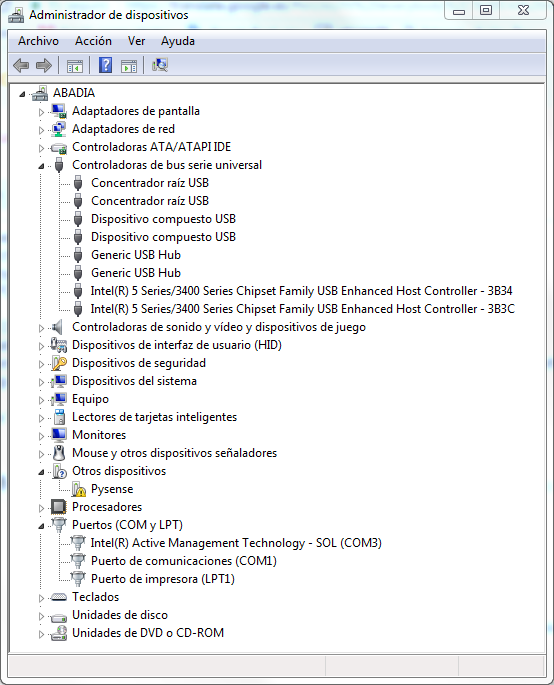
  • [SOLVED] Driver USB for PySense Windows 7 64b

    pysense usb driver lopy
    10
    1
    0 Votes
    10 Posts
    5k Views
    M
    @jmarcelino Thanks! Works fine now. Best, Marco
  • Unable to access REPL on LoPy

    lopy connection
    5
    0 Votes
    5 Posts
    1k Views
    S
    Thank you @bucknall, it worked after booting into safeboot mode.
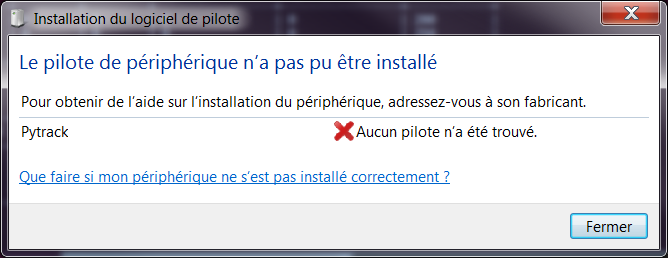
  • [SOLVED] PyTrack USB Driver

    pytrack usb
    11
    1
    0 Votes
    11 Posts
    4k Views
    E
    @stef I would like to test your GPS lib. Can you post it please ? Thanks :-)
  • Threading example

    wipy 2.0
    5
    0 Votes
    5 Posts
    2k Views
    L
    @robmarkcole no, your link is for pyboard here you have example from docs from machine import Pin def pin_handler(arg): print("got an interrupt in pin %s" % (arg.id())) p_in = Pin('P10', mode=Pin.IN, pull=Pin.PULL_UP) p_in.callback(Pin.IRQ_FALLING | Pin.IRQ_RISING, pin_handler) for pycom doc is here https://docs.pycom.io/pycom_esp32/library/machine.Pin.html#machine.Pin
  • [SOLVED] How to I create an access point DHCP server?

    dhcp
    2
    1 Votes
    2 Posts
    1k Views
    B
    I was doing the init wrong. I can't get it to give 10.10.10.9 (it gives 10.10.10.11) but I should be able to work with that somehow; will play with it more. Changes: Longer password, combine init into object instantiation. from network import WLAN import machine AP_PASSWORD = '123456abcdef' AP_wlan = WLAN(mode=WLAN.AP, ssid='WiPy', auth = (WLAN.WPA2, AP_PASSWORD), antenna = WLAN.INT_ANT) AP_wlan.ifconfig(id = 1, config = ('10.10.10.10', '255.255.255.252', '0.0.0.0', '0.0.0.0'))
  • 0 Votes
    3 Posts
    2k Views
    B
    @livius Yes this is a fresh boot with nothing in boot.py or main.py, no extra code is running. Even importing just the requested module still blows up memory. >>> import gc;gc.mem_free() 65056 >>> from urllib.parse import unquote Traceback (most recent call last): File "<stdin>", line 1, in <module> File "/flash/lib/urllib/parse.py", line 475, in <module> File "/flash/lib/urllib/parse.py", line 475, in <dictcomp> MemoryError: memory allocation failed, allocating 2344 bytes >>> All is good though. I found a module written for WiPy 1.0 that has worked around the memory issues. The problem still needs to be fixed in uPython mainline libraries, but this workaround works for me. >>> from urllib import unquote >>> unquote('abc%20def') 'abc def' >>>
  • Using Sigfox and UART 1 causes instability

    sipy uart hang unstable shared pins
    5
    0 Votes
    5 Posts
    2k Views
    N
    @jmarcelino Yes, my problem is the same as what you highlight, thanks for solving the mystery. As an temp solution (for lazy ppl) I can suggest : # hard reset if last was a soft reset if reset_cause() == 4: reset() if not 'sigfox' in locals(): sigfox = Sigfox(mode=Sigfox.SIGFOX, rcz=Sigfox.RCZ4) Regarding the UART1 activity causing Sigfox instability, I will do more tests later. Maybe update the SiPy pinout PDF to include the UART1 pins (like LoPy) as @livius mentioned?
  • 0 Votes
    1 Posts
    2k Views
    No one has replied
  • LoPy to LoPy tutorial (via LoRa)

    lopy lora mode lopy lora nodes
    5
    0 Votes
    5 Posts
    3k Views
    E
    @bucknall Thank you so much for your help! I'm ashamed but It was all my fault. The LoRa antenna on one of the devices was not correctly wired, I'm using an extension cable ... I modified the script so to have pong sending back some info: Node A: from network import LoRa import socket import time lora = LoRa(mode=LoRa.LORA, frequency=915000000) s = socket.socket(socket.AF_LORA, socket.SOCK_RAW) s.setblocking(False) while True: rec = [s.recv(64).decode()] if "Ping" in rec[0].split(" "): print(rec[0]) s.send('Pong %s' % rec[0].split(" ")[-1]) time.sleep(5) Node B from network import LoRa import socket import time lora = LoRa(mode=LoRa.LORA, frequency=915000000) s = socket.socket(socket.AF_LORA, socket.SOCK_RAW) s.setblocking(False) x=0 while True: s.send('Ping %s' % x) time.sleep(5) x=x+1 print(s.recv(64).decode()) I can send the code via wifi on the LoPy with no needs of microsd card on the device. If the wifi connection drop or I close it, the LoRa communication keeps goig :) when I reconnect with wifi in the atom shell I can actually see the ping number growing. More post coming soon, but I'll make sure to check the wiring first ... I'm really excited! Thanks!
  • Onboard temperature sensor

    temperature
    2
    0 Votes
    2 Posts
    1k Views
    L
    @BetterAuto said in Onboard temperature sensor: I suppose that it is still not avaiable in ESP-IDF (or not ported yet to pycom). ESP have also hall sensor not avaiable yet and few other things..
  • [SOLVED] A machine.reset() different than pushing reset

    reset
    12
    0 Votes
    12 Posts
    4k Views
    S
    daniel said in New firmware release 1.6.12.b1: Fix bug caused by machine.reset(). Used a quick WDT reset instead which actually performs a full reset of the chip.
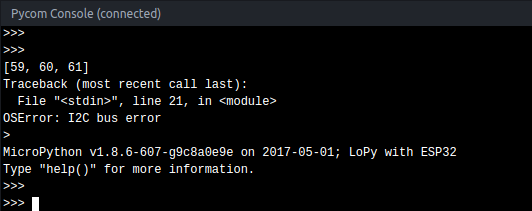
  • I2C accelerometer model MMA7455

    lopy i2c sensor mma7455 i2c bus error
    25
    3
    1 Votes
    25 Posts
    11k Views
    P
    @jmarcelino @livius @robert-hh Hey all, thx a lot for helping me this last days with this driver. This is the code i have until now... it's a shame that i didn't make it, but i think that i could have broken the sensor when i plugged CS to 5v instead of 3V3. I think i will buy another one, that will take some weeks until it gets to Uruguay :P Anyway, this is the code we've made until now, maybe it's useful for someone else. It's not throwing the ugly i2c bus error anymore, but the device id registry is returning always zero, and that's bad... not sure if the device is broken or what, but comparing this code with the implementation @livius has referenced, and with other implementations i found on google for other languages, it looks like the retrieval of the device id is the first action almost everyone does, so... i dont know. from machine import I2C from machine import Pin from machine import Timer import time def DelayUs(us): Timer.sleep_us(us) #i2c slave address SLAVE_ADDRESS = 0x1D #registers REG_POWER_CTL = 0x2D REG_BW_RATE = 0x2C #connected to SDO and CS of MMA7455 CS = Pin("P23", mode=Pin.OUT) CS.value(1) CS.hold() DelayUs(1000) #main i2c = I2C(0, I2C.MASTER, baudrate=100000) print(i2c.scan()) def setPowerCtrl(measure, wake_up=0, sleep=0, auto_sleep=0, link=0): power_ctl = wake_up & 0x03 if sleep: power_ctl |= 0x04 if measure: power_ctl |= 0x08 if auto_sleep: power_ctl |= 0x10 if link: power_ctl |= 0x20 i2c.writeto_mem(SLAVE_ADDRESS, REG_POWER_CTL, bytes([power_ctl])) #***************************** #******* main logic ********** #***************************** data = i2c.readfrom_mem(SLAVE_ADDRESS, 0x00, 1) print("DEVID: " + str(bin(data[0]))) #set power characteristics setPowerCtrl(1, wake_up=0, sleep=0, auto_sleep=0, link=0)

Pycom on Twitter