• Pygo1 gps and lorawan libraries

    PyGo gps lorawan
    9
    0 Votes
    9 Posts
    146 Views
    robert-hhR
    @hjoe I stopped. There is no reason to carry on until Pycom issues a major rework of the firmware and the PyLife app.
  • 0 Votes
    2 Posts
    362 Views
    N
    @combaindeft Did you find any solution? We have ended up with the EXACT same problem. Poor antenna. I mean, good relative to the size – but our application is not size constrained. I actually consider abandonning the pytrack alltogether and get a seperate gps module, accellerometer etc.
  • lopy sigfox know if message is sent

    LoPy lopy4 sigfox gps callback
    2
    0 Votes
    2 Posts
    339 Views
    E
    @raaden89 Simply you can't. Sigfox as very very low downlink ability ( network to your device as 4*8 bytes limits per day!) . You just can't design this functionnality as is, and you need to think to another way to work. exemple:wait in your device for a downlink coming from sigfox with a sequencial number index, send after that the gps pos with following index and so on. On the next download your device will receive a new index (or the same at the last time if no uplink as been successfull) and your device will restart to send the gps pos following the index recevied.
  • 0 Votes
    7 Posts
    707 Views
    D
    Going back to the 1.18.0.r1 and reseting the GPS did not help. The firmware updater (1.15.2.b1) installs the 1.18.1.r10 version of the firmware and I'm unable to find the 1.20.rc4 version of the firmware.
  • PyBytes Location Source

    Support & Troubleshooting fipy gps pytrack pybytes location
    4
    0 Votes
    4 Posts
    607 Views
    J
    @protean Hi, when you click on "get location button", Device scans the wifi networks around and sends the result to Pybytes. Pybytes is using Google location API to figure out and the location.
  • Getting Started with GPS

    LoPy pytrack gps lopy4
    2
    0 Votes
    2 Posts
    694 Views
    danD
    @dfcarpenter could you try leaving the Pytrack for ~30 mins outside, to pick-up the satellites data, as this is a cold-start, could take a while. Also check with a mobile app how many satellites are visible on your exact position, it could be a glitch. You could try alternative GPS libraries like micropyGPS or this alternative L76GNSS module.
  • Seting up RTC based on GPS data

    MicroPython gps pytrack rtc
    1
    0 Votes
    1 Posts
    633 Views
    No one has replied
  • Pytrack GPS library

    Discussion pytrack gps library gps pytrack
    11
    0 Votes
    11 Posts
    2k Views
    G
    @tttadam Hi. Looks like you might have found my L76micropyGPS.py useful. Any feedback welcome! I just updated the doco as the issue has been resolved, and I had not updated the README.
  • 0 Votes
    2 Posts
    606 Views
    D
    @matt3526 Thingsboard has nice documented tracking use-case: https://thingsboard.io/fleet-tracking/
  • 0 Votes
    2 Posts
    732 Views
    C
    @alexpul said in Turn GPS back on after pytrack.go_to_sleep(gps=False): I am using pytrack.go_to_sleep(gps=False) in the lib/pycoproc.py define your own funcion: def gps_state(self, gps=True): # enable or disable back-up power to the GPS receiver if gps: self.set_bits_in_memory(PORTC_ADDR, 1 << 7) else: self.mask_bits_in_memory(PORTC_ADDR, ~(1 << 7)) easiest way is for you to search for "def go_to_sleep(self, gps=True)" in the file, and place your custom function above or below it :-) ... and then you can execute it (Turn on): pytrack.gps_state() and (Turn off): pytrack.gps_state(gps=False) good luck 👍🏻
  • LTE Available Towers

    GPy gpy lte gps
    5
    0 Votes
    5 Posts
    817 Views
    robert-hhR
    @panda With the command: lte.send_at_command('AT!="setDbgPerm full"') There is also : lte.send_at_command('AT!="Help"') which gives you the command list, and lte.send_at_command('AT!="help <command>"') e.g. lte.send_at_command('AT!="help help"') telling you, how to use help to get the list section by section. The list is quite long.
  • UART: I cannot get any reading from GPS

    GPy gpy uart expansion board gps
    4
    0 Votes
    4 Posts
    732 Views
    A
    @robert-hh Hooray! I've got it! Signal wire was broken between pin and GPS. Thanks.
  • 0 Votes
    4 Posts
    1k Views
    S
    @archana-kadam Just add micropyGPS.py to your project folder and add import micropyGPS to main.py. If you have trouble uploading the file you should read the documentation.
  • How to make sense of gps data sent to sigfox

    SiPy gps sipy lopy sigfox
    4
    1
    0 Votes
    4 Posts
    1k Views
    E
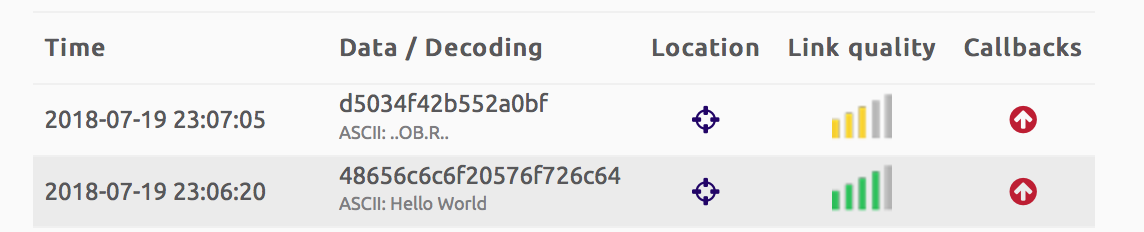
    @james-matthews struct.unpack work with "byte" objet. As we have to unpack a float this "byte" object must have a size of 4 bytes. [https://docs.python.org/2/library/struct.html] This float , have been packed in a binary form '''s.send(struct.pack('f',float(latitude)) + struct.pack('f',float(longitude)))''' then sent to sigfox backend data and showed in hexadecimal '''d5034f42b552a0bf''' so, to have original value you just have to unpack it from hexadecimal to float ''' lat=b'\xd5\x03\x4f\x42' '''this is the way to create and assign hexadecimal value to a 'python byte object' with len=4
  • Can anyone help me get started with a gps tracker

    LoPy lopy lora gps
    4
    0 Votes
    4 Posts
    2k Views
    A
    @james-matthews I've experimented with a lopy (lora via the things network) and sipy (sigfox). Lora via TTN is not yet very well covered in my region (Belgium) Sigfox coverage is much better. But you need to check on there site to see if you region is covered. The pytrack module does it job mostly giving me a decent resolution. I had the sigfox running on a 2 amp lipo battery for over 2 months, waking up every hour. in my experience, the pytrack has problems getting a fix in a moving car. Sigfox is free the first year you sign up. Commercial lora providers can be expensive, and almost always orientated to commercial customers (meaning people who buy lots of devices). Andre
  • GPS error: (None, None) coordinates

    Expansion Board pytrack gps
    4
    0 Votes
    4 Posts
    916 Views
    F
    Thank's for your replies ! I though that the module couldn't catch signal for indoor, and this is why I tried outdoor. I had buildings around me but clear a view of sky for about 20 minutes and still no data. I've tried printing the frames, and I only get invalid data: '$GPGLL,,,,,000200.800,V,N*70\r\n' V means invalid data, N means no fix for GPS I started digging into the protocol specification for L76 device and saw multiple commands to configure it. Do you know some that may help getting better signal ? (I found Active Interference Cancellation for example, but it is activated by default). Thank's again !

  • 2 Votes
    1 Posts
    909 Views
    No one has replied
  • Using more data from PyTrack

    Expansion Board pytrack gps pytrack gps micropython
    2
    0 Votes
    2 Posts
    920 Views
    J
    There are indeed enhanced libraries other contributors already shared, though it depends exactly what data you are looking for. A few links to check out: https://github.com/inmcm/micropyGPS https://github.com/andrethemac/L76GLNSV4/blob/master/L76GNSV4.py from @andrethemac
  • Clearing UART buffers

    Discussion uart gps
    14
    0 Votes
    14 Posts
    2k Views
    robert-hhR
    @bitvijays the default rx buffer size us 512. But you can set it when instantiating the uart object with the parameter rx_buffer_size=nnn Whether that can be set to a value like 40000 has to be tested.
  • SD Card - Store GPS GPS-coordinates to SD card

    LoPy gps sd card pytrack lopy
    3
    1
    0 Votes
    3 Posts
    1k Views
    L
    Also you have not checked if coord = l76.coordinates() return something it can contain None