• FiPy not connecting to MQTT with LTE CatM1

    FiPy mqtt lte
    4
    0 Votes
    4 Posts
    1k Views
    T
    @dylan Hi Dylan. I am using MQTT constantlty over CAT-M1 on Telstra. I am only using. lte.send_at_cmd('AT+CGDCONT=1,"IP","telstra.internet"') lte.send_at_cmd("AT!=\"RRC::addscanfreq band=28 dl-earfcn=9410\"") lte.send_at_cmd('AT+CFUN=1') And have not had to resort to the additional AT commands you are using. I have also found the reset the modem if I have lost the connection and am reconnecting without a power cycle. lte.send_at_cmd('AT^RESET') Other than that its working very reliably for me. I am not using mqtt but using the AWS client (not to connect to AWS) as I need TLS with certificate support. We use Losant. They do support port 1883. T
  • 1 Votes
    1 Posts
    705 Views
    No one has replied
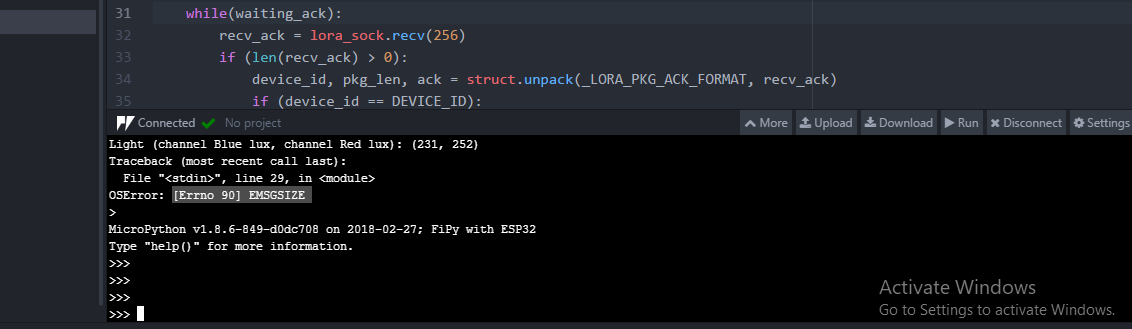
  • OS Error [Errno 90] EMSGSIZE

    MicroPython mqtt fipy pysense
    13
    1
    0 Votes
    13 Posts
    3k Views
    robert-hhR
    @nick_w OK. b.t.w.: The test I tried to make did not give the epxected result, simply because TTN uses SF9BW125 in the RX2 window in the downlink for every data rate < 4. I could try with Loriot, but maybe later.
  • Using MQTT send data to server

    MicroPython mqtt lora fipy
    19
    0 Votes
    19 Posts
    3k Views
    A
    @jmarcelino We have already added the file mqtt.py, and main.py is blank Thank you
  • 0 Votes
    2 Posts
    725 Views
    T
    Could you guy provide resolution to above error please ?
  • AWS MQTT 'Packet sent. (Length: 2)' periodic message

    WiPy 2&3 aws mqtt wipy3.0
    7
    1 Votes
    7 Posts
    1k Views
    R
    @inverseeffect Did you ever get any resolution on the keepalive timer? I'm running into the same issue. For now I've switched to simple.py, but I would much rather use the AWS library.
  • Sending data to server using MQTT

    FiPy mqtt fipy server mosquitto
    10
    0 Votes
    10 Posts
    2k Views
    N
    @timh Ok, i have connected the fipy to our wifi network & it is connected successfully, and also checked the ip address address and ping fipy is working.
  • MQTT cannot subscribe to adafruit

    LoPy mqtt adafruit subscribe
    3
    0 Votes
    3 Posts
    1k Views
    V
    @seb Hi sorry seb, because the upper part is only wifi configuration so i didnt show it. Here is the whole main.py from network import WLAN from mqtt import MQTTClient import machine import time import pycom #from machine import Pin #pin=Pin('P10',mode=Pin.IN, pull=Pin.PULL_UP) wlan = WLAN(mode=WLAN.STA) wlan.antenna(WLAN.EXT_ANT) wlan.connect("xxx", auth=(WLAN.WPA2, "xxx"), timeout=5000) while not wlan.isconnected(): machine.idle() print("Connected to Wifi\n") def settimeout(duration): pass def sub_cb(topic, msg): print(msg) client = MQTTClient(client_id="xxx", server="io.adafruit.com",user="vickyho", password="xxx", port=1883) client.settimeout=settimeout client.set_callback(sub_cb) client.connect() print("connected to broker\n") client.publish(topic="vickyho/feeds/lights",msg="False") print("Published!") time.sleep(10) client.subscribe(topic="vickyho/feeds/lights") print("Subscribed!") while True: client.check_msg() if client.subscribe(topic="vickyho/feeds/digital",msg="ON") pycom.rgbled(0xff00) print("Led ON") time.sleep(3) if client.subscribe(topic="vickyho/feeds/digital",msg="OFF") pycom.heartbeat(False) pycom.rgbled(0x0000) print("Led OFF") time.sleep(3) thanks for your reply btw!
  • MQTT connection returning OSError : -1

    FiPy mqtt socket fipy pycom
    4
    0 Votes
    4 Posts
    1k Views
    L
    @mdk22 But you make some modifications?
  • 0 Votes
    4 Posts
    1k Views
    L
    @siejak simple use e.g.: try: s.send(data) except: connectToRouter()
  • Restart mqtt service?

    LoPy mqtt mqtt connect
    1
    0 Votes
    1 Posts
    654 Views
    No one has replied
  • 0 Votes
    19 Posts
    6k Views
    L
    @sunrise17 you must modify esp_get_revision - i do not have guide but on the forum you can find such posted by @robert-hh https://forum.pycom.io/post/13828
  • 0 Votes
    7 Posts
    3k Views
    J
    @johanbrichau thanks for your example project! I am having trouble getting this to work based on your project. are you able to share an example of you config.py file? How do you load the rsa file and generate it?
  • MQTT Reconnect How To ???

    MicroPython mqtt mqtt connect wipy2.0
    2
    0 Votes
    2 Posts
    1k Views
    L
    @pturcotte You should got exception from some sending code and then you can catch it and reconnect to the network https://forum.pycom.io/post/14510
  • 0 Votes
    4 Posts
    2k Views
    robert-hhR
    @gruia-nichita I do not work with the pymakr plugin. It's too obscure for my opinion. You can always copy the file to the board with ftp, using FileZilla or FireFTP. Instructions on how to do that are in the docs: https://docs.pycom.io/chapter/toolsandfeatures/FTP.html
  • MQTT: OSError: -1 from line 160, in wait_msg

    WiPy 2&3 mqtt wipy oserror
    2
    1 Votes
    2 Posts
    1k Views
    D
    @semireg We'll have a look to see if there's a bug in the socket implementation.
  • Protocol for industrial MQTT

    Comments & Feedback mqtt
    2
    0 Votes
    2 Posts
    846 Views
    M
    Their is no standard protocol except the simple QOS, topics etc. This is why its so fast and useful. I suggest to build your own protocol. Create packet definition like [CMD][DATA][CRC] This would be s imple packet you could enhance and add encryption if required.
  • Issue publishing via mqtt

    LoPy mqtt
    2
    0 Votes
    2 Posts
    832 Views
    S
    You have to set a callback to the subscribe, in easier words, the subscribe function need to know what to do with the msg it will get back from the server. so you have to write a callback function before start using the subscribe function. The correct code for subscribing should be like that: from time import sleep from umqtt.simple import MQTTClient CLIENT_ID = 'Board_Name' #name your board any name you want SERVER = 'm13.cloudmqtt.com' #info from servce provider Port=14250 #info from servce provider User='kaeugs' #info from servce provider Password='Euif_Ehf674qi' #info from servce provider def sub_cb(topic, msg): #the action you want to happen, when you receive a msg print((topic, msg)) client = MQTTClient(CLIENT_ID, SERVER, Port, User, Password) client.connect() # Connect to MQTT broker while True: client.set_callback(sub_cb) #callback function client.subscribe(b'Proportional') #b'Proportional is just a topic sleep(2) following this code, you should be able to subscribe to a topic and print the msg in the python console. A very helpful examples could be found here, take care these examples is for Micropython on esp8266, but the main idea is the same https://github.com/micropython/micropython-lib/blob/mqtt/umqtt.simple/example_pubsub.py https://github.com/micropython/micropython-lib/blob/mqtt/umqtt.simple/example_sub.py https://github.com/micropython/micropython-lib/blob/mqtt/umqtt.simple/example_sub_led.py
  • 0 Votes
    7 Posts
    2k Views
    A
    The same thing is happening when I replace the MQTT with the requests library and try to post to an HTTPS API. I believe the problem is th ussl.wrap_socket.
