Welcome to the Pycom forum Forum
    • \[\[global:header.categories\]\]
    • \[\[global:header.recent\]\]
    • \[\[global:header.tags\]\]
    • \[\[global:header.popular\]\]
    • Login
    1. Home
    2. Tags
    3. pymakr

    Explore Pybytes | Official Documentation | Report a Firmware Bug/Issue | GitHub

    Log in to post

    • All categories
    • A

      Two LoRa Socket

      Watching Ignoring Scheduled Pinned Locked Moved LoPy lora socket thread pymakr python
      7
      0 Votes
      7 Posts
      1k Views
      T
      @ahelllycan I think we would need to see code, or general overview of your process. At the moment we are guessing. But @jcaron is right. You should have a call back on message receive and you choose when to send messages based on other criteria. The rest of the time you will be sleeping or waiting.
    • M

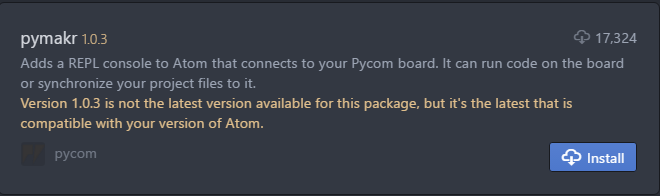
      Unable to install Pymakr 1.2.10 in Atom 1.25.0

      Watching Ignoring Scheduled Pinned Locked Moved Software Tools pymakr
      6
      1
      0 Votes
      6 Posts
      2k Views
      G
      @seb Thanks. Did the trick. Remove directory, reinstall and rebuild the package Thx, Geert
    • U

      Atom with Pymakr have some promble

      Watching Ignoring Scheduled Pinned Locked Moved Issues & Bugs pymakr bug atom
      2
      1
      0 Votes
      2 Posts
      806 Views
      sebS
      We are aware of this issue, expect and update very soon to resolve this.
    • U

      Atom with Pymakr have some promble

      Watching Ignoring Scheduled Pinned Locked Moved Software Tools pymakr bug
      2
      1
      1 Votes
      2 Posts
      584 Views
      F
      @u0452047: I think you should put it in the categories Bug/Issues
    • S

      Pymakr stopped working in Atom 1.25

      Watching Ignoring Scheduled Pinned Locked Moved Software Tools pymakr
      5
      1 Votes
      5 Posts
      1k Views
      R
      HI @smbunn, thanks for reporting, sorry for not having this issue fixed yet. We spent some time today re-compiling the serialport-lib that's in Pymakr for Atom 1.25. It hasn't succeeded yet for all operating systems. There is a new release of pymakr v1.2.10 which contains new precompiles for osx and win64, but the latter still has issues. Bear with us on this, we'll be sure to fix it in the next days. And there's always VSCode to fall back to for a few days. I'll keep you up to date.
    • C

      Version 1.18 of the Pymakr plugin fails to upload and download

      Watching Ignoring Scheduled Pinned Locked Moved Pymakr pymakr sync err pymakr fipy atom
      3
      0 Votes
      3 Posts
      1k Views
      C
      @jmarcelino In the board, I have a custom code running, and it shows what it should on the console, but whenever I try to upload a project, it fails. It had worked until I updated the plugin to the last version.
    • S

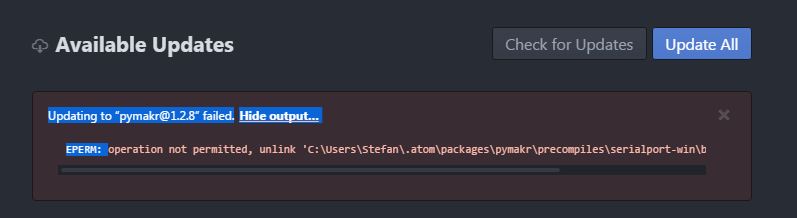
      Installing “pymakr@1.2.8” failed.Hide output…

      Watching Ignoring Scheduled Pinned Locked Moved Pymakr pymakr pycom pycom upgrade python lopy
      2
      1
      0 Votes
      2 Posts
      920 Views
      sebS
      Could you try deleting C:\Users\Stefan\.atom\packages\pymakr\ and re-install the pymakr plugin
    • K

      Atom / Pymakr not connecting to Lopy

      Watching Ignoring Scheduled Pinned Locked Moved LoPy pycom connection pymakr atom usb serial conn
      9
      0 Votes
      9 Posts
      4k Views
      sebS
      Have you tried using something other than pymakr? maybe screen or minicom. Also its worth checking if your user has permissions for the serial port. The procedure to do this varies by linux distro but on most you can add your user to the dialout group and when you reboot that user will have permissions to use serial ports sudo usermod -a -G dialout $USER
    • C

      Sublime Text 3 + PyMakr .... Status?

      Watching Ignoring Scheduled Pinned Locked Moved Software Tools pymakr
      2
      0 Votes
      2 Posts
      836 Views
      sebS
      Hi, At this time the plans to make a sublime text plugin have been cancelled, I will remove this from the documentation
    • S

      Read and write data between 2 LoPy characteristic.write(value)??

      Watching Ignoring Scheduled Pinned Locked Moved LoPy lopy ble lopy pymakr pycom
      3
      0 Votes
      3 Posts
      951 Views
      S
      @seb thanks... I look at that but I cant understand how I should do it spend alot of time with it :( and I cant get to a solution...
    • S

      machine.reset() cant get pass it... I want to upload new code but cant get in

      Watching Ignoring Scheduled Pinned Locked Moved Software Tools pymate pymakr other
      2
      0 Votes
      2 Posts
      948 Views
      sebS
      Connect a jumper between P12 and 3.3V and press the reset button, this will cause the onboard LED to flash orange, when you see this please remove the jumper. This puts the device into "safe boot", in this mode it will not run the boot.py and main.py files and drop you straight into the interactive REPL terminal
    • N

      Lopy1/Pymakr connection works on WiFi, but not on USB

      Watching Ignoring Scheduled Pinned Locked Moved Discussion pymakr lopy atom connection usb
      3
      0 Votes
      3 Posts
      994 Views
      N
      @robert-hh Thank you, that worked perfectly.
    • pierrot10P

      Can not upload file to lopy

      Watching Ignoring Scheduled Pinned Locked Moved Pymakr pymakr pymakr upload lopy
      14
      0 Votes
      14 Posts
      4k Views
      J
      @seb Same reaction here... I think however there are cases when Ctrl-C will not interrupt the currently running code right away, but have an effect only once the current call is finished or something, maybe that's related? We don't quite know what code was running... Or maybe... @pierrot10, had you actually deleted the console in Atom (clicked on the bottom part of the window) before hitting Ctrl-C?
    • M

      Woks from Atom RUN but not when uploaded

      Watching Ignoring Scheduled Pinned Locked Moved Discussion ds18b20 pymakr pysense
      2
      0 Votes
      2 Posts
      686 Views
      M
      It looks like it needs a double scan to find the rom. After inserting ow1 = OneWire(Pin('P4')) print('found devices:', ow1.scan()) Even if the print is an empty array ('found devices:[]') then the temperature reading is working with appropriate rom... Anyone can get why? Maxi
    • J

      Atom/pymakr sync file types

      Watching Ignoring Scheduled Pinned Locked Moved Issues & Bugs atom pymakr sync file type
      3
      0 Votes
      3 Posts
      946 Views
      J
      @goldfishalpha No, I just moved the txt-files outside the project folder. That is good enough for me. Johan
    • A

      WiPy 3.0 getting started issues

      Watching Ignoring Scheduled Pinned Locked Moved WiPy 2&3 wipy 3.0 serial pymakr boot.py
      11
      0 Votes
      11 Posts
      3k Views
      A
      Thank you. Everything works now. I hope that pymakr will be fixed as well.
    • R

      VSCode and Pymakr Broken?

      Watching Ignoring Scheduled Pinned Locked Moved Software Tools pymakr bug
      16
      0 Votes
      16 Posts
      4k Views
      R
      We've just uploaded a new version (0.1.6) that works on windows x64. Try it out and let me know if your problem is fixed.
    • sorenS

      OSX Pymakr Atom plugin, not seeing lopy

      Watching Ignoring Scheduled Pinned Locked Moved LoPy ftdi usb osx lopy pymakr
      8
      0 Votes
      8 Posts
      2k Views
      R
      @soren Sorry for the late reply. Atom currently always copies the top option in the list. If there is an actual Pycom serial detected, it will place that one at the top. Anyway, this is just a result of your issue, not the cause. So just to be sure, after rebooting your mac, you are able to connect to your device? Then when switching out to a different lopy, the comport disappears from the list of serials, even when closing the connection during the swap? Do you switch expansionboards, or just the lopy? You could even hot-swap your lopy while keeping the expansion board connected, see if that helps.
    • philwilkinsonP

      wrong serialport selected and copied to clipboard on initial config

      Watching Ignoring Scheduled Pinned Locked Moved Pymakr pymakr atom lopy pysense
      7
      0 Votes
      7 Posts
      2k Views
      philwilkinsonP
      OK now works! I changed the device address in the global settings to the correct Com port and rebooted Atom and it picked it up fine. Thanks again, @seb, rather strange this has only just started to happen!
    • J

      Appending data on an SD card file

      Watching Ignoring Scheduled Pinned Locked Moved Discussion sipy pymakr sd card pycom
      5
      0 Votes
      5 Posts
      2k Views
      J
      Hi @seb Thanks that clears things up a lot! I didn't know I could list the methods in each module either, useful to know... That would be fantastic if you could add this sort of extra detail in the documentation, I'm sure that will save me a lot of time! Thanks again.
    • 1
    • 2
    • 3
    • 4
    • 5
    • 6
    • 7
    • 8
    • 4 / 8