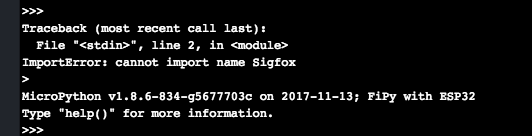
The file is called main.py, and it always was, so i don't think it can be it. I have a project created, and all the file are inside, i can access it through windows explorer as well, for the code, i can explain it, and post a screen about it if you want.
I use the internal RTC (even if i can't update the time, i can initialise it and do something when X date is reached, even if there is no save if the system is not alimented anymore, that's enough for me) i also use an analogic pin for taking a battery pourcentage, and i send a message when a pin receive something.
If you really want all the code here it is
from network import Sigfox
from machine import Pin
from machine import RTC
import pycom
import socket
import machine
import time
class ComSigFox:
msg = ""
localisation = ""
socket = ""
Etat = ""
tailleManquante = 0
Compteur = 0
def __init__(self):
# Initialise SigFox en Europe (RCZ1)
localisation = Sigfox(mode=Sigfox.SIGFOX, rcz=Sigfox.RCZ1)
def sendMsg(self, paramMsg):
pycom.rgbled(0x007f00) # vert
# Créer un socket SigFox
s = socket.socket(socket.AF_SIGFOX, socket.SOCK_RAW)
# Bloque le socket
s.setblocking(True)
# Configure le socket en Uplink seulement (False / True)
s.setsockopt(socket.SOL_SIGFOX, socket.SO_RX, False)
msg = paramMsg
msg += " %"
if((len(msg) ) < 5 ): # Si le message fait en dessous de 5 caractères
tailleManquante = 5 - (len(msg))
for Compteur in range(tailleManquante):
msg = msg + " "
# On rajoute des espaces autant de fois
# Que nécessaire pour avoir 5 caractères
Etat = "Close"
if(Etat == "Open"):
Etat = "Open "
msg = msg + Etat
s.send(msg)
return True
class Batterie:
Voltage = 0
Charge = 0
def __init__(self):
pass
def getBattery(self):
adc = machine.ADC(bits = 10) # create an ADC object
apin = adc.channel(pin='P20', attn = machine.ADC.ATTN_11DB) # create an analog pin on P20
i = 0
MoyenneVolt = 0
for i in range(1,50):
time.sleep(0.1)
val = apin() - 698
Mesure = (val / 1024) * 5
MoyenneVolt += Mesure
Voltage = MoyenneVolt / 49
print(Voltage)
# Condition tension avec équation 0 - 10% de charge
if(Voltage >= 1.32496 and Voltage <= 1.41429):
Charge = (429.71806 * pow(Voltage,2)) - (1065.15152 * Voltage) + 656.90476
# Condition tension avec équation 10 - 30% de charge
if(Voltage > 1.41429 and Voltage <= 1.45895):
Charge = (404108.59608 * pow(Voltage,3)) - (1741647.28089 * pow(Voltage,2)) + (2502325.58922 * Voltage) - 1198510
# Condition tension avec équation 30 - 60% de charge
if(Voltage > 1.45895 and Voltage <= 1.52594):
Charge = (540257.28470 * pow(Voltage,4)) - (3000615.37231 * pow(Voltage,3)) + (6220087.42278 * pow(Voltage,2)) - (5699263.94063 * Voltage) + 1945763.58460
# Condition tension avec équation 60 - 100% de charge
if(Voltage > 1.52594 and Voltage <= 1.58921):
Charge = (348000.83082 * pow(Voltage,3)) - (1629386.97406 * pow(Voltage,2)) + (2543268.59982 * Voltage) - 1323295.17637
Charge = int(round(Charge,0))
print("")
print(Charge)
print("")
# La fonction int() n'arrondit pas, elle ne fait que tronquer, ainsi, il faut faire un int de l'arrondi qui seras par exemple
# 49.0, le résultat seras donc le nombre 49.
return Charge
class HorlogeRTC:
rtc = 0
Date = 0
stringHeureDate = ""
stringMinutesDate = ""
stringSecondesDate = ""
intHeureDate = 0
intMinuteDate = 0
intSecondesDate = 0
HeureSouhaite = 0
MinuteSouhaite = 0
SecondeSouhaite = 0
HeureFinal = 0
MinuteFinal = 0
SecondeFinal = 0
TempsTotalAttente = 0
def __init__(self):
rtc = RTC()
rtc.init((2018, 5 , 16 , 17, 19, 50, 0 ))
# rtc.init(Année , mois , jours , heures , minutes, secondes, millisecondes)
def getTime(self):
Date = RTC().now()
return Date
def CalcTime(self,Date):
Jour = False
stringHeureDate = Date[3]
stringMinutesDate = Date[4]
stringSecondesDate = Date[5]
s_intHeureDate = int(stringHeureDate) * 3600
s_intMinutesDate = int(stringMinutesDate) * 60
s_intSecondesDate = int(stringSecondesDate)
s_TempsTotalActuel = s_intHeureDate + s_intMinutesDate + s_intSecondesDate
HeureSouhaite = 17 * 3600
MinuteSouhaite = 20 * 60
SecondeSouhaite = 10
s_TempsTotalSouhaite = HeureSouhaite + MinuteSouhaite + SecondeSouhaite
# TempsTotalAttente en seconde
if(s_TempsTotalSouhaite < s_TempsTotalActuel):
TempsTotalAttente = (s_TempsTotalSouhaite - s_TempsTotalActuel) * -1
else:
TempsTotalAttente = s_TempsTotalSouhaite - s_TempsTotalActuel
if(Jour == False):
Jour == True
return TempsTotalAttente
elif(Jour == True):
return 86400 + TempsTotalAttente
def TempoVerifMesure(TempsRestantHorlogeParam):
Max = 0
Diviseur = 0
TempsAttenteBoucle = str(TempsRestantHorlogeParam)
print(TempsAttenteBoucle)
if(len(str(TempsAttenteBoucle)) == 5):
Diviseur = 10000
TempsAttenteBoucle = int(TempsRestantHorlogeParam) / Diviseur
if(len(str(TempsAttenteBoucle)) == 4):
Diviseur = 1000
TempsAttenteBoucle = int(TempsRestantHorlogeParam) / Diviseur
if(len(str(TempsAttenteBoucle)) == 3):
Diviseur = 100
TempsAttenteBoucle = int(TempsRestantHorlogeParam) / Diviseur
if(len(str(TempsAttenteBoucle)) == 2):
Diviseur = 10
TempsAttenteBoucle = int(TempsRestantHorlogeParam) / Diviseur
print(TempsAttenteBoucle)
#Pin de l'ILS
#ILS = Pin('P23',mode=Pin.IN,pull=Pin.PULL_UP)
Max = Diviseur
pycom.rgbled(0x7f0000) # red
for i in range(0,Max,1):
time.sleep(TempsAttenteBoucle)
print("Tempo... {0}".format(Max))
#if(ILS() == True):
# return True
return True
if __name__=="__main__":
Horloge = HorlogeRTC() # On initialise la classe HorlogeRTC
Battery = Batterie() # On initialise la classe Batterie
SigFox = ComSigFox() # On initialise la classe ComSigFox
pycom.heartbeat(False)
while(True): #Le programme tourne en permanance dans cette boucle
envoiSigFox = False
while(envoiSigFox == False): # Tant que le message SigFox n'est pas envoyé on boucle ici
Date = Horloge.getTime() # On récupère la date
TempsRestantHorloge = Horloge.CalcTime(Date) # On calcule le temps restants avant la date souhaite en secondes
intCharge = Battery.getBattery()
if(TempoVerifMesure(TempsRestantHorloge) == False): # Condition pour que le message SigFox s'envoie (Temporisation de TempsRestantHorloge + vérif ILS)
pycom.rgbled(0x7f7f00) # jaune
else:
SigFox.sendMsg(str(intCharge))
envoiSigFox = True