Subcategories

  • General software tool discussion

    5 Topics
    12 Posts
    robert-hhR
    To my greatest regret the FireFTP of Firefox is not supported any more since Version 60 of FireFox. That ftp client was always easy and fast to use. OK, FileZilla and command line ftp work too, but FireFTP was more convenient. Sigh ........
  • Software tool wishlist & desired features

    9 Topics
    30 Posts
    P
    Heya, There is currently no system in place to export data. but one should be ready soon. Paul
  • Anything related to software tool issues & bugs

    86 Topics
    415 Posts
    S
    I think there could be several causes for this problem. It could be because your network connection is unstable. Or your time like the date and time on your device is set wrong. It could also be because you are trying to register more devices than the device registration limit.
  • Pymakr 1.1.13 does not work with VSCode 1.60.0

    24
    1
    0 Votes
    24 Posts
    224 Views
    B
    @robert-hh said in Pymakr 1.1.13 does not work with VSCode 1.60.0: @jchernandez mpremote has a --help option. For copying files, you have to use the cp subcommand. So as example for copying a file to the board: mpremote connect /dev/ttyUSB0 cp myfile.py :myfile.py or just mpremote connect /dev/ttyUSB0 cp myfile.py : for using : as a shortcut for the baord's local directory and . for the PC's one. Copying back similar as: mpremote connect /dev/ttyUSB0 cp :myfile.py myfile.py or mpremote connect /dev/ttyUSB0 cp :myfile.py . The device names at Windows are similar COM3, COM4, .... Shortcuts are: u0 for connect /dev/tty/USB0 Unfortunately the mount command of mpremote does not work with the PyCom version of MicroPython. That version is too old. To run a local script without copying it to the board use the run command. If you do not enter a command after the connect, mpremote opens a REPL session cat mario And before I forget it: With Pycom devices and WiFi active you can always use FTP for copying files. A good FTP client is FileZilla. But some file managers allow using FTP paths as well. User name is micro, password is python. you can review the .py file, i think it has that problem
  • This topic is deleted!

    1
    0 Votes
    1 Posts
    2 Views
    No one has replied
  • Update tool version 1.1.2b1 failed on Windows 10

    2
    0 Votes
    2 Posts
    820 Views
    F
    @bigboy20769driving directions When using the new updater tool on Windows 10, has anybody had any luck? However, I was unable to get it to execute since the cStringIO library is required. Due to It being superseded by the IO library, I was unable to track it down online.
  • 0 Votes
    2 Posts
    49 Views
    C
    @nervencid said in Pymakr and VSCode 'sync_all_file_types' Configuration flag: Hello to all: I'm using VSCode with PyMakr, for upload NO .py files to flash memory, the folders are created fine However the files (extension .pem) are not uploaded. I find the 'sync_file_types' flag into 'settings.mddordle' file and i set it in true but doesn't have any effect (how can i setup this on VSCode?). In atom i switch this option to true in options panel and the files seems to be uploaded to the board properly. Can PyMakr extension of The VSCode work like atom one? Thank you and sorry for the English Where do I configure this in VSCode? I found the'sync file types' value in the'settings.md' file and set it to true, but nothing changed. After setting this preference to true in Atom's settings window, the files were successfully uploaded. Is the VSCode PyMakr add-on compatible with atom?
  • Problem Reset after upload

    other
    2
    0 Votes
    2 Posts
    502 Views
    S
    @rodo said in [Problem Reset after uploadphrazle](/post/22837): Hi, I have a problem when I upload a project on my L01 via wifi reseting is actually failing, blue heartbeat is present, I tried machine.reset() too but still no reseting. I have to unplug manually the battery to reset it. I also observe that if I switch the connection to uart when the module is in this funky mood and try again machine.reset() it's working. Since my product is always connected to a battery is this a software problem ? Thanks While the blue heartbeat is there and I have tried using machine.reset(), I am unable to reset my L01 after uploading a project through wifi. The only way to get it to reset is to take the battery out by hand. When the module is acting up, I've found that switching the connection to uart and then trying machine.reset() again fixes the problem.
  • reset before wifi (pyscan + gpy)

    5
    0 Votes
    5 Posts
    327 Views
    C
    @duckyjan007 said in reset before wifi (pyscan + gpy): This was a good knowledge help. You can always download music using scdownloader mod apk at here maybe it useful, thanks
  • M1 Mac and Pycom

    2
    0 Votes
    2 Posts
    29 Views
    No one has replied
  • What software to use on M1 Mac? Atom & Pymakr not working

    6
    0 Votes
    6 Posts
    72 Views
    M
    Hello @ventureoverland . You are not alone ... One of the most annoying things I have experienced since I delved into the MicroPython/Python and JavaScript ecosystems is that you are always suffering from "dependency hell" issues here and then ... Myself being more familiar with statically linked binary executable development tools, where the apps work for ever for a given base OS, did not expect that almost all MicroPython/Python/JavaScript development tools rely on external modules that keep evolving all the time and cause former good working apps to break unexpectedly. That is the case with all Pycom editor plugins, be it for Atom or for Visual Studio Code. As a result, I have resorted to the following actions in order to keep my development system working at all times, no matter what: On my M1 Mac ( MacBook Pro 13" ) I manually downloaded and installed the version "1.58.2, x86_64 bit" of "Visual Studio Code" (download link here). Then I installed the version "1.1.12" of the Pymakr plugin from Pycom (download link here) In Visual Studio Code preferences, I set the "Update: Mode" to "None" and the "Extensions: Auto Update" to "None", so that VSCode won't automatically update either itself or the extensions/plugins without my consent, which can potentially break the Pymakr plugin. After performing these steps, I have not suffered any "sudden break" of my Pycom boards development environment. I do not have the specific steps for Atom, but they should be similar to the ones I have listed for Visual Studio Code. Hope this helps you, since the Pymark plugin does add nice functionality on top of what a raw serial communication tool can offer. PS: There are a lot of new versions of Pymakr plugins released since the version that I reliably use ( 1.1.12 ), but to me it is a lot more important to have a stable, reliable and dependable development tools than to be chasing the "latest and greatest" features out of the plugins ... The "dependency hell" of the Python/JavaScript worlds seems to be something you have to take for granted ...

  • Pybytes Device provisioning Issue

    4
    0 Votes
    4 Posts
    42 Views
    G
    Hello, Just for testing purpose, could you please reset the device while the mobile application with the active provisioning is running ? So something like: Start the unprovisioned device - so it starts executing the "Smart Config" Start the mobile app and the provisioning Reset the device - so it starts executing the "Smart Config" Keep the mobile app with the active provisioning running and see whether it can provision the device
  • BLE client configuration on SiPy

    7
    0 Votes
    7 Posts
    55 Views
    A
    @jcaron I was able to solve the problem. The use of the callback actually waits until a notification is provided by the BLE server, so then the client is able to read a data. Whenever I try to read the data immediately (as the first script I posted) empty data is read. So the configuration you provided me with the use of the callback works. Thanks
  • Fast FFT for IoT application

    other
    2
    0 Votes
    2 Posts
    42 Views
    J
    @Garth-Paine You may want to check previous threads on the topic: https://forum.pycom.io/topic/4663/lopy4-fft-spectrum-analysis-micropython-adding-c-code https://forum.pycom.io/topic/6444/ulab-fft-spectrogram-performance-drops-for-8192-points-and-beyond See also: https://forum.pycom.io/topic/6234/pycom-firmwares-with-single-double-precision-and-ulab-module https://github.com/ph-robadel/ulab_samples#benchmark-of-fft-with-1024-points
  • Problem Serial port connexion and save file voltage variable

    1
    0 Votes
    1 Posts
    21 Views
    No one has replied
  • Have an higher baudrate than 115200 with the updater and serial link

    3
    0 Votes
    3 Posts
    39 Views
    Yusuf BAYLAVY
    Hello again Thierry, To be more precise, the baud rate value is adjustable. There are two ways to perform that: a) You may rebuild the firmware by changing the _boot.py in the frozen base. Please check [HERE](https://github.com/pycom/pycom-micropython-sigfox/blob/Dev/esp32/frozen/Base/_boot.py b) You may load your own boot.py into your device which will overwrite the current one and will end up working at 921600 baud rate. I hope this helps.
  • atom, pymakr and linter-pylint

    4
    0 Votes
    4 Posts
    958 Views
    J
    Hi there, I'm Jos , the author of the stubbing tool created to solve my personal frustration If there is interest I would be happy to provide support for intellicode and static typechecking for pycom boards. My primary focus is VSCode and PyLance, but the stubs are stand based stubs so any IDE and tool can be configured to use them For me the blocking challenge is that I do not have access to any pycom hardware. If there are a few people that can spend some time to run a few commands and the firmware stubber on their boards , and share the outcomes of that. I think this is quite simple to improve the developing experience and thus the code quality of your projects, (having a pycom board to test on won't harm either ) See Generic procedure for manual stubbing Scripts to run : https://github.com/Josverl/micropython-stubber/tree/main/board Please share results and feedback on https://github.com/Josverl/micropython-stubs/discussions
  • send_signal() parameter scope

    1
    0 Votes
    1 Posts
    23 Views
    No one has replied
  • Pycom fwtool cli package for buildroot

    1
    0 Votes
    1 Posts
    11 Views
    No one has replied
  • pycom-fwtool does not start. Error loading Python DLL.

    other
    5
    2
    0 Votes
    5 Posts
    41 Views
    C
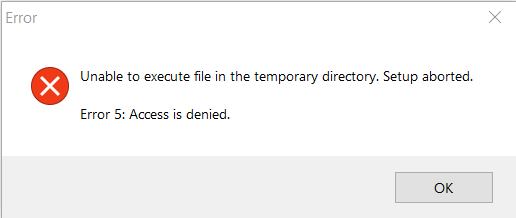
    @robert-hh Nope. De-install does not work either. But, as I expected, it was indeed all related to the 'Users\AppData\Local\Temp' folder. I have tried every suggestion I could find to unlock this folder, but nothing worked. Finally I just created a new C:\TEMP folder, and edited the Environment Variables so both TEMP and TMP pointed at that new folder. And now everything works. Not sure if this will create problems in the future, but for now I'm up and running again.
  • PyMakr v1.1.14

    1
    0 Votes
    1 Posts
    31 Views
    No one has replied
  • pymakr plugin with multiple devices

    pymakr
    10
    2 Votes
    10 Posts
    2k Views
    E
    Alternatively I've let my modules connect in STA mode to the existing office net. Just need to determine their assigned ip address (... print(wlan.ifconfig()[0]). After modifying <user>.atom\packages\pymakr\lib\config.js around line 60 and following as shown below (add those additional ip addresses), I restarted my Atom IDE and now I can connect to my modules at their WiFi ip enjoying the REPL console: the additional addresses show up under 'Connect Device'. static settings() { return { address: { type: "array", items: { type: "string" }, default: ["192.168.4.1", "192.168.3.207"], title: "Device addresses (list)", ![alt text]([image: 1632842145414-0a71a7b2-eae4-4a89-95cd-d9c51a99d677-image.png] image url)
  • 1 Votes
    2 Posts
    134 Views
    M
    Now, I have the same problem =/

Pycom on Twitter