• LiPo battery charging efficiency

    lipo battery charger low power
    2
    0 Votes
    2 Posts
    660 Views
    J
    @jardar It's not really possible to give one efficiency figure for the built-in charger because of the many modes and dynamic operation. For full details I refer you to the datasheet of the charger chip used, the BQ24040 http://www.ti.com/lit/ds/symlink/bq24040.pdf
  • This topic is deleted!

    1
    0 Votes
    1 Posts
    22 Views
    No one has replied
  • Educational Grove shield for Pycom devices

    grove shield sensors
    2
    4 Votes
    2 Posts
    690 Views
    J
    @marcozennaro Great project, thank you for sharing
  • 0 Votes
    19 Posts
    4k Views
    robert-hhR
    @bed Yes, approach it step by step. First check the RF connection witrh the simple examples, which are tricky too. Then try ABP join, since that does not need downlink messages. After that go for OTAA join. There is indeed a problem with DRl 0 in the official 1.17.3.b1 revision, see https://github.com/pycom/pycom-micropython-sigfox/commit/ae3a294c40026433dbdac3e08da788b2b4c4dfdb, but that should not affect here.
  • Error while uploading files to GPy

    upload failure gpy
    4
    0 Votes
    4 Posts
    870 Views
    S
    @jmarcelino @robert-hh Thank you for the inputs guys! This is what solved the issue for me, I thoroughly debugged the functions written in sensors.py file. There were some errors in the newly implemented functions which I corrected and then things started working fine!
  • Firmware release roadmap

    firmware release
    5
    2 Votes
    5 Posts
    896 Views
    J
    Hi A roadmap would be highly appreciated, even if dates can not be set in detail it would be nice if there where som sort of roadmap with what features that can be expected in the next few releases. This could also be a way to get input on the priority of what goes into each release. At the same time it gives some indication on what features we can expect and thus do some planning accordingly by finding workaround solution or adjust the features of the product depending on the the pycom modules.
  • BLE GATTC write perfomance

    bluetooh performance write characteristic
    1
    0 Votes
    1 Posts
    506 Views
    No one has replied
  • Interface Wipy with water flow meter

    dac 4-20ma sensor wipy transceiver
    2
    0 Votes
    2 Posts
    630 Views
    J
    Hi @ricardo85 Can you share what water flow meter you're planning to use? Are you sure you want the WiPy to be a transmitter or a receiver?
  • Where do you start or find at least example code?

    Moved sipy general pysense
    3
    0 Votes
    3 Posts
    959 Views
    S
    @freddy I have some Pysense code to send almost all of it over LoRa. Might be useful as a starting point. It is on GitHub at https://github.com/smbunn/FiPy in the python program 'sense.py' and the latest copy is pasted below. # See https://docs.pycom.io for more information regarding library specifics from network import LoRa #import config from pysense import Pysense from LIS2HH12 import LIS2HH12 from SI7006A20 import SI7006A20 from LTR329ALS01 import LTR329ALS01 from MPL3115A2 import MPL3115A2,ALTITUDE,PRESSURE import time # import library for delay times import pycom import socket import binascii import struct import ujson # Colors off = 0x000000 red = 0xff0000 green = 0x00ff00 blue = 0x0000ff yellow = 0xffff00 # Initialize LoRa in LORAWAN mode. lora = LoRa(mode=LoRa.LORAWAN) # Set up KotahiNet channels lora.add_channel(0, frequency=864862500, dr_min=0, dr_max=5) lora.add_channel(1, frequency=865062500, dr_min=0, dr_max=5) lora.add_channel(2, frequency=865402500, dr_min=0, dr_max=5) lora.add_channel(3, frequency=865602500, dr_min=0, dr_max=5) lora.add_channel(4, frequency=865985000, dr_min=0, dr_max=5) lora.add_channel(5, frequency=866200000, dr_min=0, dr_max=5) lora.add_channel(6, frequency=866400000, dr_min=0, dr_max=5) lora.add_channel(7, frequency=866600000, dr_min=0, dr_max=5) # Turn off hearbeat LED pycom.heartbeat(False) # create an ABP authentication params dev_addr = struct.unpack(">l", binascii.unhexlify('00 70 C3 4D'.replace(' ','')))[0] nwk_swkey = binascii.unhexlify('1BFE9C81AD35B39019244D155CE31D88'.replace(' ','')) app_swkey = binascii.unhexlify('045ABBEFE974D3E257AC31522E8E837B'.replace(' ','')) # join a network using ABP (Activation By Personalization) lora.join(activation=LoRa.ABP, auth=(dev_addr, nwk_swkey, app_swkey)) # create a LoRa socket s = socket.socket(socket.AF_LORA, socket.SOCK_RAW) # set the LoRaWAN data rate s.setsockopt(socket.SOL_LORA, socket.SO_DR, 0) # Builds the bytearray to send the request py = Pysense() si = SI7006A20(py) lt = LTR329ALS01(py) li = LIS2HH12(py) for count in range (2000): print("Count=", count) vt = py.read_battery_voltage() print("Battery voltage: " +str(vt)) dew = si.dew_point() print("Dew point: "+ str(dew) + " deg C") mp = MPL3115A2(py,mode=ALTITUDE) # Returns height in meters. Mode may also be set to PRESSURE, returning a value in Pascals print("MPL3115A2 temperature: " + str(mp.temperature())) temp1 = mp.temperature() alt1 = mp.altitude()+100.0 print("Altitude: " + str(alt1)) mpp = MPL3115A2(py,mode=PRESSURE) # Returns pressure in Pa. Mode may also be set to ALTITUDE, returning a value in meters press1 = mpp.pressure() print("Pressure: " + str(press1)) #Pressure does not work too well temp2 = si.temperature() hum1 = si.humidity() print("Temperature: " + str(temp2)+ " deg C and Relative Humidity: " + str(hum1) + " %RH") t_ambient = 24.4 relhum = si.humid_ambient(t_ambient) print("Humidity Ambient for " + str(t_ambient) + " deg C is " + str(relhum) + "%RH") print("Light (channel Blue lux, channel Red lux): " + str(lt.light())) acct = li.acceleration() acc1 = acct[0] acc2 = acct[1] acc3 = acct[2] roll1 = li.roll() pitch1 = li.pitch() print("Acceleration: " + str(acc1)) print("Roll: " + str(roll1)) print("Pitch: " + str(pitch1)) # Flash the light every time a payload is sent pycom.rgbled(blue) time.sleep(0.5) pycom.rgbled(off) time.sleep(0.5) pycom.rgbled(red) time.sleep(0.5) pycom.rgbled(off) data = bytearray(48) data[0:4] = bytearray(struct.pack(">i", count)) data[4:8] = bytearray(struct.pack(">f", vt)) data[8:12] = bytearray(struct.pack(">f", dew)) data[12:16] = bytearray(struct.pack(">f", temp1)) data[16:20] = bytearray(struct.pack(">f", alt1)) data[20:24] = bytearray(struct.pack(">f", press1)) data[24:28] = bytearray(struct.pack(">f", temp2)) data[28:32] = bytearray(struct.pack(">f", hum1)) data[32:36] = bytearray(struct.pack(">f", relhum)) data[36:40] = bytearray(struct.pack(">f", acc1)) data[40:44] = bytearray(struct.pack(">f", acc2)) data[44:48] = bytearray(struct.pack(">f", acc3)) # data[48:52] = bytearray(struct.pack(">f", roll1)) # data[52:56] = bytearray(struct.pack(">f", pitch1)) print ('Data = ',count,vt,dew, temp1, alt1, press1, temp2, hum1, relhum, acc1, acc2, acc3, roll1, pitch1 ) s.setblocking(True) s.send(data) # send buffer to AWS print('data sent') time.sleep(0.5) # get any data received& s.setblocking(False) data = s.recv(64) time.sleep(0.5) print(data) #anything received?time.sleep(20) # wait time between packets sent time.sleep(59) Note : I had to comment out the last two float values for roll and pitch as you are limited to 51 bytes when using SF12. The Git Hub has my Node--Red implementation which decodes the payload. Simon

  • This topic is deleted!

    1
    0 Votes
    1 Posts
    17 Views
    No one has replied
  • Relay and solenoid valve

    fipy transistor expansion board pinouts
    3
    2
    0 Votes
    3 Posts
    990 Views
    M
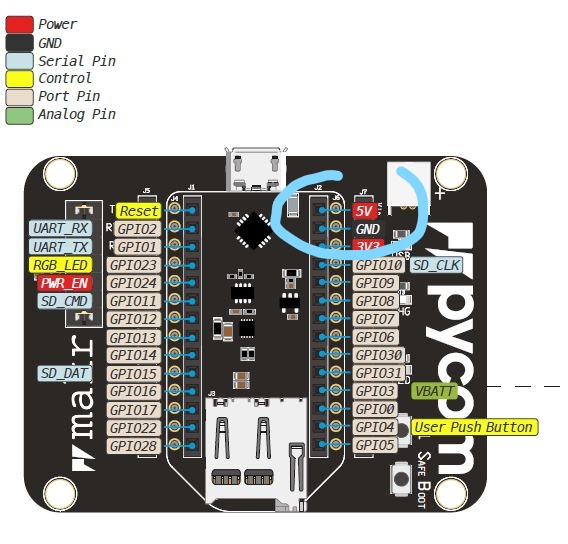
    @matthew said in Relay and solenoid valve: e if i can power the relay using the 5v o The "5V" label of the expansion board v. 3 is in reality the voltage input value. It can be around 5V when the board is connected with USB cable (if attached to a 5V source), but it is not when is power is sourced by the LiPo battery. On board there is a TPS2115A, that switches from one source to the other when, for example the battery is connected and we plug the USB cable. The Vin can be from 3.5 to 5.5 V. Solenoid valve control You can use many different options to control the solenoid valves as well as ways to power the solenoid valves and mechanical relay or equivalent driver. I personally prefer isolated solutions like optocouplers, solid state relays (photo MOSFET) (price went down in last years), ... An alternative can be, if You need to drive more than one, darlington transistor arrays like ULN2003, the low voltage ULN2003LV, or the newer equivalent TPL7407L. You can easily found mechanical relay boards with onboard optocoupler. You need to heck the datasheet to look for the mA at 3.3V that they sink.
  • Cut out of the fipy

    fipy expansion board telnet error
    3
    0 Votes
    3 Posts
    738 Views
    M
    @livius Thank you i will try immediately
  • 0 Votes
    2 Posts
    1k Views
    catalinC
    hi @sprasad, So you're interfacing orientation sensor directly with GPY, right? You could control RST pin of GPY, or control Vin(3.5V-5.5V) from your powering scheme.
  • This topic is deleted!

    2
    0 Votes
    2 Posts
    62 Views
  • This topic is deleted!

    4
    0 Votes
    4 Posts
    51 Views
  • Connecting two Lopy4's to Wi-Fi Help

    lopy4 wifi two connection prob send data
    2
    0 Votes
    2 Posts
    675 Views
    robert-hhR
    @letsgo If you have a home router & access point, the easiest is to have both LoPys connected to that. For that, follow the instructions at https://docs.pycom.io/chapter/tutorials/all/wlan.html, section: Connecting to a router. if you want to connect them directly, one of them has to run as access point (AP), the other as station (STA). Since the devices run as AP by default, you just have to reconfigure one of them the way, told above.
  • GPy with BNO055 - I2C bus error

    accelerometer gpy i2c bus error
    9
    0 Votes
    9 Posts
    2k Views
    M
    @sprasad said in GPy with BNO055 - I2C bus error: I2C(0, I2C.MASTER, baudrate=1000, pins=(Pin.exp_board.G15, Pin.exp_board.G16)) > ``` Expansion board G15 and G16 are P8 and P9. P8 is the SD_Data, but You don't use the SD card, the P9 on expansion board is the "led" pin. Try removing the led jumper "enable led signal" on expansion board to disable it.
  • Unable to change WiFi mode: 802.11g/n

    fipy wifi range long range
    1
    0 Votes
    1 Posts
    585 Views
    No one has replied
  • ESP32 light sleep availability

    light sleep sleep power saving
    1
    0 Votes
    1 Posts
    786 Views
    No one has replied
  • Availability PyScan

    pyscan
    1
    1 Votes
    1 Posts
    492 Views
    No one has replied

Pycom on Twitter