• 1 Votes
    8 Posts
    1k Views
    robert-hhR
    @philwilkinson For readable data you could also use: data = "%.2f" % si.temperature() and use float(recv_data) for back-conversion.
  • LoPy4 433Mhz

    lopy4 433mhz
    13
    0 Votes
    13 Posts
    2k Views
    robert-hhR
    @bmarkus Hello Bèla. I now tested OTAA join. Due to the timing jitter of the gateway, I wanted to use RX2 for the join response. So Ive set that in the device parameters of the Loriot server. But that did not work. The join response appeared in the RX1 window. Did I expected something wrong from the settings, or just looked at the wrong place? P.S.: After a few attempts, join also worked at the RX1 window.
  • Pin mapping for SPI / I2C connection to Cinterion TC65T module

    i2c spi lopy4 tc65t
    1
    0 Votes
    1 Posts
    479 Views
    No one has replied
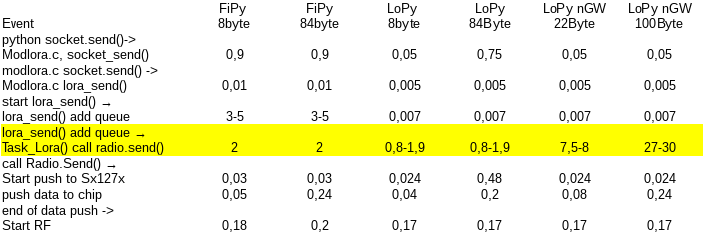
  • [(not)Solved] LoRa timing of LoPy and FiPy

    timing lora lopy fipy lopy4
    8
    1
    0 Votes
    8 Posts
    2k Views
    robert-hhR
    @sympatron ACK, so my tendency is to close that attempt.
  • Correct UART pins and problems

    lopy4 uart honeywell serial expansion board
    3
    0 Votes
    3 Posts
    1k Views
    robert-hhR
    @hopkapi If you connect G24 aka P3 -> 7 G11 aka P4 -> 6 GND -> 8 GND Vin -> 2 (5V) and run the LoPy from USB. then the electrical conditions shoul be OK, and the device shoudl be accessible via UART 1. SOmetimes the definition of Tx and Rx are reversed, so you may swap P3 and P4. That should not cause any harm to the devices. The UART setting according to the data sheet is baud rate: 9600, databits: 8, stopbits: 1, parity: no Some test code would be like: from machine import UART uart = UART(1, 9600) # init with given baudrate uart.init(9600, bits=8, parity=None, stop=1) # init with given parameters while True: data = uart.readall() if data is not None: print(data)
  • Snail mail detection via LoRaWAN

    lopy lora
    5
    2
    3 Votes
    5 Posts
    1k Views
    Z
    @philwilkinson Thanks Phil, it was a fun project and something I wanted to try for a long time. I will share the code in a moment. The communication between the 2 LoPy's is based on the 'ping-pong' example, although some messages were added. The 'mailServer.py' is the code running in the mailbox. The 'mailClient.py' is the client running in my home. When the client starts it does a getStatus() to get the status from the server ('mail'/'no mail': it could be that mail came in when the client was not running). Then it sends a reset command so the mailServer resets ( so I do not have to power down the server each time mail was detected) Every minute the getStatus() is also executed. In fact getStatus() tries 3 times to get the status. If that does not succeed, I assume the battery is dead and the clients LED turns red. It turns green when getStatus() succeeds, but there is no mail, blue when mail was detected. My next step is to connect the client to my Wifi network also (via a socket or so), allowing me to send an email when snail mail came in or the battery is dead... To answer your questions, it uses the LoRa protocol. I estimate the distance to be 50 to 70 meters, but with a lot of concrete and a steel elevator in between. The antenna wire is now in a sleeve in the mail box door, because vandals stripped the antenna twice. 1_1531328973387_mailClient.py 0_1531328973387_mailServer.py It seems to work well, especially with these settings for tx_power and sf: lora = LoRa(mode=LoRa.LORA, frequency=863000000, tx_power=14, sf=7)

  • Micropython Counter

    lopy4 data counting sd card
    2
    0 Votes
    2 Posts
    604 Views
    S
    Python code without proper indentation is not very useful. You should try to put it inside a code block like this: import time import machine from machine import Pin tip_num = 0 tip = (Pin('P10', mode=Pin.IN, pull=Pin.PULL_UP)) tip([1]) while tip !="": tip_num += 1 tip_value = (tip) total += tip_value tip = (Pin('P10', mode=Pin.IN, pull=Pin.PULL_UP)) print("Counter", tip_num) print("Done") Apart from that there are a lot of mistakes (e.g. tip([1])) and redundancies (e.g. wrapping everything in parenthesis) in your code. You should probably read the the MicroPython and Pin documentation first.
  • Unable to boot when on breadboard (LoPy)

    freeze boot mode not booting not started
    1
    0 Votes
    1 Posts
    388 Views
    No one has replied
  • Nano-gateway and Node

    lorawan lora lopy nano gateway otaa
    9
    0 Votes
    9 Posts
    1k Views
    robert-hhR
    @robert-hh To be more precise, it is in branch nanogateway at the URL: https://github.com/robert-hh/pycom-libraries/blob/master/examples/lorawan-nano-gateway/nanogateway.py
  • lorawan nano Gateway Program

    lopy lorawan lopy4 lorawan nano gw tutorial lopy lora
    3
    0 Votes
    3 Posts
    581 Views
    H
    @robert-hh Thanks for your reply. Yeah exactly I am talking about repeater. Just let me know once they develop this part. Till then I will try to do by myself.
  • Changing address in pymakr.conf has no effect

    pymakr address changes
    3
    0 Votes
    3 Posts
    567 Views
    danD
    Hi @zappfinger, Which version of Atom and Pymakr do you have? I have just tried using 2 LoPys and changing the address in the config file, it worked fine for me.
  • LoRa code organisation, extending to EU433

    lora eu433 code organisati
    1
    1 Votes
    1 Posts
    428 Views
    No one has replied
  • I2C bus error pytrack read_battery_voltage()

    i2c bus error
    2
    0 Votes
    2 Posts
    489 Views
    A
    @chvl I have the same issue with bus errors on battery read so I use a 'try' 'except' to catch the error and I limit my battery check to something reasonable - like every 10 minutes eg: batt_check_interval = 600 # check the battery voltage every 10 minutes def readBattery(): global vBatt global last_batt_check global batt_check_interval if(utime.time() - last_batt_check > batt_check_interval): try: vBatt = pytrack.read_battery_voltage() # keep track of time since last battery check last_batt_check = utime.time() print ('Battery read: ' + str(vBatt)) if (vBatt < lowBatt): # do more here print ('Battery voltage: LOW') except Exception as e: print ('Battery read: ERROR') return return
  • Can anyone help me get started with a gps tracker

    lopy lora gps
    4
    0 Votes
    4 Posts
    2k Views
    A
    @james-matthews I've experimented with a lopy (lora via the things network) and sipy (sigfox). Lora via TTN is not yet very well covered in my region (Belgium) Sigfox coverage is much better. But you need to check on there site to see if you region is covered. The pytrack module does it job mostly giving me a decent resolution. I had the sigfox running on a 2 amp lipo battery for over 2 months, waking up every hour. in my experience, the pytrack has problems getting a fix in a moving car. Sigfox is free the first year you sign up. Commercial lora providers can be expensive, and almost always orientated to commercial customers (meaning people who buy lots of devices). Andre
  • 0 Votes
    1 Posts
    469 Views
    No one has replied
  • Set TX Power in LoRaWAN Mode

    lorawan txpower lopy
    7
    0 Votes
    7 Posts
    3k Views
    R
    @dan Well, don't understand why it is like that. Due to a research project I have had to "hack" the libraries to allow changing the transmission power. Should anyone need it, send me a PM (I have just programmed a "dirty" workaround so not even daring to push a change to github or something like that!)
  • Comipling error

    lopy lopy4 compile error
    2
    0 Votes
    2 Posts
    528 Views
    X
    @harish-kumar Did you follow the guide at https://docs.pycom.io/chapter/pymakr/installation/atom.html
  • Bluetooth on Lopy4 doesn't detect any device

    bluetooth lopy4 scan
    2
    0 Votes
    2 Posts
    674 Views
    danD
    Hi @AlejandroReyes, I've just tried this code and managed to find my BT headphones with it. The issue could be that your devices don't use BLE, so the LoPy board couldn't find them. Currently, only BLE is supported. You can find more on this on the Bluetooth docs page. Let me know if this helped!
  • Is it possible to update time using Lora Otaa?

    lopy rtc otaa synchronize
    9
    0 Votes
    9 Posts
    2k Views
    J
    @charly86 thank you, I will try it
  • 0 Votes
    2 Posts
    595 Views
    bmarkusB
    @harish-kumar said in To send data to cloud via lorawan instead of using wifi.: Hello everyone, I am using Lopy, I am new to this. I need to send some data to cloud via Lorawan instead of using wifi. Is it possible ? If it is , can anyone say me the procedures ? First check whether LoRaWAN is good for your application, it depends on the volume of data you are transmitting, what is the latency your application can accept, etc. Provide details. If it fits to your use case from networking view we can discuss how to implement.

Pycom on Twitter