• What does the PWR_EN pin on Pysense do?

    Discussion fipy pysense control pin
    6
    0 Votes
    6 Posts
    1k Views
    S
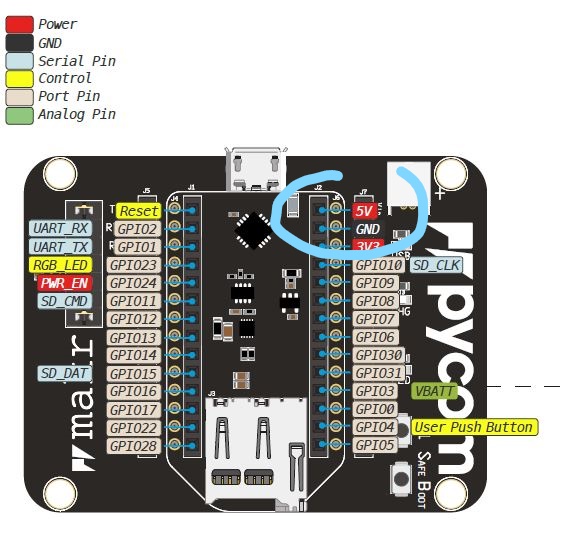
    Can everyone explain me how is pwr_en works? Can I wakeup the board over pwr_en and gnd from deepsleep? Can I force a reset over this pin? Pycom doc confuse me 😊
  • 0 Votes
    13 Posts
    3k Views
    F
    @pmb_nl Yes it works without any problems the last few weeks so far
  • 0 Votes
    2 Posts
    639 Views
    robert-hhR
    @rubencg195 The pull/push ack messaage show the communication via Internet to the TTN server. Independent of that, the LoRa device is always listening, except when it is sending itself. But that would only happen after an uplink message has been send and it was told by the server so deliver a downlink message. It might only happen, that if there are many nodes around sending, then the gateway may have started to listen to another message. A few notes. always use the software from the git repository. Do not copy it form the documentation. Use the latest firmware version with the software from the git repository. The nanogateway is listening on a single channel only. If you do not configure the node accordingly, the node will send on different channels. The examples for abp_node and otaa_node shoudl cater for that. Besides that, I have a comibinatin of a LoPy as nano-gateway and FiPy as nodes running, and they never seem to miss a packet.
  • [Solved]:FiPy socket.connect command

    FiPy fipy socket connect post
    4
    0 Votes
    4 Posts
    2k Views
    J
    Hi @dda socket.connect doesn't take a domain name, you need to resolve it first into a tuple like this - (family, type, proto, canonname, sockaddr) - which you can obtain from socket.getaddrinfo() In your case doing: s.connect(socket.getaddrinfo(addr, port)[0][-1]) should do what you want. There currently isn't a way to obtain your assigned IP address.
  • Restrict TLS to V1.2 only

    FiPy fipy ussl ssl tls
    1
    0 Votes
    1 Posts
    568 Views
    No one has replied
  • LTE high current consumption

    FiPy fipy lte high current
    8
    0 Votes
    8 Posts
    2k Views
    A
    @jmarcelino Any update on the fn to enable LOW power LTE option?
  • NB-IoT on fipy

    Comments & Feedback nb-iot fipy amarisoft
    7
    0 Votes
    7 Posts
    2k Views
    N
    @jmarcelino I am still in need of a way to use NB-IoT on fipy. Is there a way to achive it? As I can see others have the same problem as me, so can we have some update on the state of the matter?
  • Deep Sleep on Fipy

    Comments & Feedback fipy deep sleep deep sleep shie
    4
    0 Votes
    4 Posts
    1k Views
    D
    @jmarcelino I'm getting the following error: Traceback (most recent call last): File "main.py", line 13, in <module> AttributeError: 'RTC' object has no attribute 'irq' MicroPython v1.8.6-849-83e2f7f on 2018-03-19; FiPy with ESP32 Type "help()" for more information.
  • Problems updating FiPy

    FiPy fipy firmware upgrade
    4
    0 Votes
    4 Posts
    1k Views
    T
    That worked perfectly. Thanks, Zac
  • 0 Votes
    2 Posts
    754 Views
    J
    @smbunn It's still a single step to change the LoRa region but now you can either fix it in firmware configuration, or use the region= parameter. I recommend always the region parameter going forward. The firmware method was added more so existing code without the region parameter wouldn't break.
  • Relay and solenoid valve

    Discussion fipy transistor expansion board pinouts
    3
    2
    0 Votes
    3 Posts
    1k Views
    M
    @matthew said in Relay and solenoid valve: e if i can power the relay using the 5v o The "5V" label of the expansion board v. 3 is in reality the voltage input value. It can be around 5V when the board is connected with USB cable (if attached to a 5V source), but it is not when is power is sourced by the LiPo battery. On board there is a TPS2115A, that switches from one source to the other when, for example the battery is connected and we plug the USB cable. The Vin can be from 3.5 to 5.5 V. Solenoid valve control You can use many different options to control the solenoid valves as well as ways to power the solenoid valves and mechanical relay or equivalent driver. I personally prefer isolated solutions like optocouplers, solid state relays (photo MOSFET) (price went down in last years), ... An alternative can be, if You need to drive more than one, darlington transistor arrays like ULN2003, the low voltage ULN2003LV, or the newer equivalent TPL7407L. You can easily found mechanical relay boards with onboard optocoupler. You need to heck the datasheet to look for the mA at 3.3V that they sink.
  • FiPy getting hot

    FiPy accelerometer fipy hot
    5
    0 Votes
    5 Posts
    1k Views
    D
    @jmarcelino Yeah, all up to date to the latest firmware. We are working them pretty hard, I guess they are reaching somewhere into the 45+ degrees C
  • All radios on by default

    FiPy fipy radio energy power saving
    16
    0 Votes
    16 Posts
    3k Views
    T
    @jmarcelino I've tested this now (removed lte = LTE() and lte.deinit() ) and the peak is still there. The device goes into deep sleep, but like before the current rises quickly to about 200 mA for a couple of seconds before it goes into deep sleep. I also find it strange that it doesn't happen the first time the device goes into deep sleep, but all consecutive runs. The first time now, since I don't deinit() LTE the current is at about 200 mA and drops down to deep sleep. Then when waking up it is around 60-70 mA when measuring and then peaks to 200 right before deep sleep.
  • Cut out of the fipy

    Discussion fipy expansion board telnet error
    3
    0 Votes
    3 Posts
    786 Views
    M
    @livius Thank you i will try immediately
  • Expansion board v3.0 doesn't go in Dfu mode

    Firmware fipy
    7
    2
    0 Votes
    7 Posts
    2k Views
    catalinC
    hi @Matthew, First, you should not have anything plugged in the Expansion Board, no Lopy/Fipy. On Windows, the fact that went up to 96% and stopped, means there are USB problems(lots of retries and timeout). Try changing something, USB port, cable. We had lots of problems with poor USB cables. Maybe try to remove other USB peripherals, from your PC. On Linux, please, check if board is in dfu mode, looking at lsusb output, 04D8:EF99 should be visible. It's not clear from dfu-util error, Cannot open DFU device 04d8:ef99, if the device is not enumerated or you don't have rights. As wild try, maybe you should keep just RX and TX jumpers, on Expansion Board. <later edit>: FYI, the Expansion board 3 has already the latest firmware, we released just once

  • 0 Votes
    17 Posts
    4k Views
    D
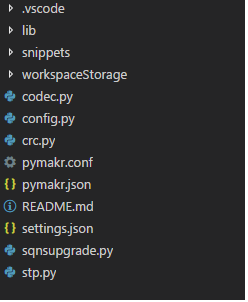
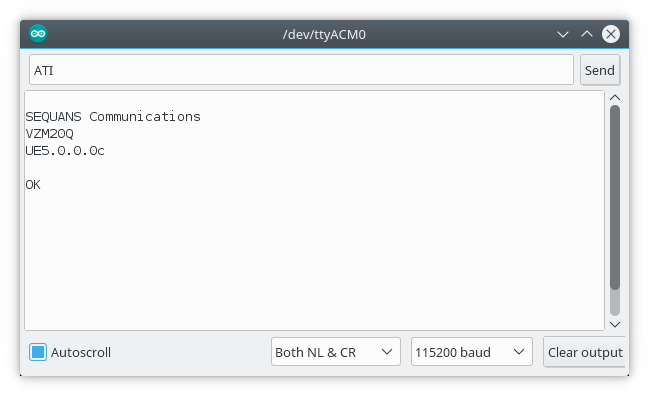
    @jmarcelino And on retrying the firmware upgrade again, this time I am getting a different error once and back to the same AT+SMSWBOOT failed error <<< Welcome to the SQN3330 firmware updater >>> Entering recovery mode Resetting. Starting STP (DO NOT DISCONNECT POWER!!!) Traceback (most recent call last): File "main.py", line 2, in <module> File "/flash/lib/sqnsupgrade.py", line 114, in run NameError: local variable referenced before assignment MicroPython v1.8.6-849-83e2f7f on 2018-03-19; FiPy with ESP32 Type "help()" for more information. >>> <<< Welcome to the SQN3330 firmware updater >>> Entering recovery mode Traceback (most recent call last): File "main.py", line 2, in <module> File "/flash/lib/sqnsupgrade.py", line 98, in run OSError: AT+SMSWBOOT=3,0 failed! MicroPython v1.8.6-849-83e2f7f on 2018-03-19; FiPy with ESP32 Type "help()" for more information. >>> I have not done any changes to my code or file since the last error: OSError: AT+SMSWBOOT=3,0 failed!
  • Using PyCom boards with Arduino IDE

    Guides arduino fipy
    19
    2
    6 Votes
    19 Posts
    6k Views
    J
    I'm getting this error whenever I try to compile anything for the GPy: [15975] Error loading Python lib '/var/folders/57/hyd6ntr1233_x_brscxdp8480000gn/T/_MEI7xbrkg/libpython3.8.dylib': dlopen: dlopen(/var/folders/57/hyd6ntr1233_x_brscxdp8480000gn/T/_MEI7xbrkg/libpython3.8.dylib, 10): Symbol not found: ____chkstk_darwin Referenced from: /var/folders/57/hyd6ntr1233_x_brscxdp8480000gn/T/_MEI7xbrkg/libintl.8.dylib Expected in: /usr/lib/libSystem.B.dylib in /var/folders/57/hyd6ntr1233_x_brscxdp8480000gn/T/_MEI7xbrkg/libintl.8.dylib I have just re-installed Python 3.9. Anyone know how to fix this?