Welcome to the Pycom forum Forum
    • \[\[global:header.categories\]\]
    • \[\[global:header.recent\]\]
    • \[\[global:header.tags\]\]
    • \[\[global:header.popular\]\]
    • Login
    1. Home
    2. Tags
    3. fipy

    Explore Pybytes | Official Documentation | Report a Firmware Bug/Issue | GitHub

    Log in to post

    • All categories
    • F

      Entering download mode [FiPy 1.0 + Pysense]

      Watching Ignoring Scheduled Pinned Locked Moved FiPy fipy pysense
      2
      0 Votes
      2 Posts
      62 Views
      robert-hhR
      @Filisia-Melissari With the pysense the pycom updater will switch the FiPy to download mode. (assuming you mean bootloader mode). besides that, you can always force bootloader mode by connecting P2 to GND and pushing the reset button on the FiPy. P2 is available on the external IO header of PySense, the middle pin in the row with the square pin, or at the FiPy itself.
    • T

      LTE Modem interference

      Watching Ignoring Scheduled Pinned Locked Moved FiPy fipy modem lte
      2
      0 Votes
      2 Posts
      89 Views
      G
      Hi, From what I understand, the Fipy's LTE modem no longer responds to you in the Pysense V2 (That is what cannot determine modem state! means). You mention using different fipys and pysenses etc. Do you have multiple Fipys experiencing this issue? Only on Pysense 2.0 X, or also on Pysense 1? Are you using additional accessories on the Pysense through the expansionpins? Can you try the following for me on the Fipy that does not work. Completely wipe the Fipy flash (in the pycom firmware update tool, advanced section clear NVS, CONFIG and erase flash check marks) and update to the latest firmware 1.20.2.r1. Let me know Gijs

    • S

      Fipy LTE Won't Attach

      Watching Ignoring Scheduled Pinned Locked Moved Getting Started lte telia fipy
      2
      0 Votes
      2 Posts
      124 Views
      S
      Updates I guess my sims aren't activated for LTE-M (they should be) but only NB-IoT. I upgraded my modem to NB1-41019 and it works now :)
    • P

      Mystery with network.WLAN on a FiPy

      Watching Ignoring Scheduled Pinned Locked Moved Pymakr network.wlan fipy requested opera
      3
      0 Votes
      3 Posts
      78 Views
      J
      @paul_tanner What's the value of net.sec in you case?
    • T

      OSError: resource not available for UART

      Watching Ignoring Scheduled Pinned Locked Moved FiPy uart micropython fipy
      3
      0 Votes
      3 Posts
      118 Views
      T
      @robert-hh I see, that what I thought. then I will reuse UART1. Thanks :)
    • N

      Improve stability on connection with AWS

      Watching Ignoring Scheduled Pinned Locked Moved FiPy fipy aws iot aws stability connect issues
      1
      0 Votes
      1 Posts
      57 Views
      No one has replied
    • N

      Can i read AWS certificates from a SD CARD?

      Watching Ignoring Scheduled Pinned Locked Moved FiPy fipy aws mqtt aws certificate sd card
      1
      0 Votes
      1 Posts
      48 Views
      No one has replied
    • W

      Fipy LTE

      Watching Ignoring Scheduled Pinned Locked Moved FiPy fipy lte
      3
      0 Votes
      3 Posts
      249 Views
      R
      Also you might want to have a look at this thread, might be useful, since it took a lot of effort for me to be able to connect to Azure IoT Hub with my FiPy. FYI: I am using a regular phone sim-card from Telia (Scandinavian mobile provider), which is possible since they have LTE coverage in most of Northern Europe, and Germany as well i suppose. https://forum.pycom.io/topic/5713/send-data-to-azure-iothub-with-mqtt-protocol-without-using-pybytes-solved
    • M

      Fipy, umqtt.simple library: check_msg() is blocking

      Watching Ignoring Scheduled Pinned Locked Moved Issues & Bugs fipy mqtt mqtt bugs azure nb-iot
      4
      2 Votes
      4 Posts
      285 Views
      A
      Someone found a workaround - check out this github here: https://github.com/pycom/pycom-micropython-sigfox/issues/424
    • S

      Fipy crashing when using Loramesh

      Watching Ignoring Scheduled Pinned Locked Moved FiPy fipy firmware lora pymkr loramesh
      9
      1
      1 Votes
      9 Posts
      518 Views
      S
      @catalin Ok, I will try the licensing then. Thank you very much.
    • J

      Bluetooth - updating multiple notify characteristics at the same time

      Watching Ignoring Scheduled Pinned Locked Moved FiPy fipy bluetooth
      1
      0 Votes
      1 Posts
      174 Views
      No one has replied
    • L

      FiPY NB-IOT connection never attaches Vodaphone Sim London

      Watching Ignoring Scheduled Pinned Locked Moved FiPy vodafone cat-nb1 london fipy
      1
      0 Votes
      1 Posts
      226 Views
      No one has replied
    • D

      UART Write

      Watching Ignoring Scheduled Pinned Locked Moved FiPy fipy uart
      1
      0 Votes
      1 Posts
      257 Views
      No one has replied
    • T

      Using Pybytes with FiPy, NB-IoT and Vodafone Sim from GoInvent London event

      Watching Ignoring Scheduled Pinned Locked Moved FiPy fipy nb-iot vodafone goinvent pybytes
      4
      0 Votes
      4 Posts
      564 Views
      K
      @hayesey I am looking for a SIM card NB-IoT enabled in the UK. Could you let me know how you get your SIM card, or where I can find one please?
    • W

      FiPy with NB-IoT sim cards but no signal

      Watching Ignoring Scheduled Pinned Locked Moved FiPy nbiot nb-iot fipy lte at commands
      19
      0 Votes
      19 Posts
      2k Views
      robert-hhR
      @naveen No clue. When it did not work for me, I could not get a hand on debugging. I only purchased another LTE NBIoT module to verify, that the service was available and the SIM worked. It did. Module type SIM7020.
    • I

      BAND support for GPY and FIPY

      Watching Ignoring Scheduled Pinned Locked Moved Announcements & News lte lte-m lte nb iot fipy gpy
      8
      1 Votes
      8 Posts
      1k Views
      J
      @naveen I paid EUR 2.90 for the return postage.
    • M

      LTE antenna not working on board

      Watching Ignoring Scheduled Pinned Locked Moved FiPy fipy lte
      7
      0 Votes
      7 Posts
      559 Views
      M
      Found the issue, appears like the pcb regulator causing the issue.
    • M

      How to determine Modem firmware version?

      Watching Ignoring Scheduled Pinned Locked Moved FiPy fipy lte
      2
      0 Votes
      2 Posts
      313 Views
      robert-hhR
      @misterlisty >>> from network import LTE >>> lte=LTE() >>> print(lte.send_at_cmd('AT!="showver"')) SYSTEM VERSION ============== FIRMWARE VERSION Bootloader0 : 5.1.1.0 [39529] Bootloader1* : 6.0.0.0 [41019] Bootloader2 : 6.0.0.0 [40343] NV Info : 1.1,0,0 Software : 6.0.0.0 [41019] by robot-soft at 2018-12-13 21:41:15 UE : 6.0.0.0 COMPONENTS ZSP0 : 1.0.99-3171 ZSP1 : 1.0.98-3170 OK >>>
    • M

      Bricked?

      Watching Ignoring Scheduled Pinned Locked Moved Discussion fipy
      8
      0 Votes
      8 Posts
      554 Views
      C
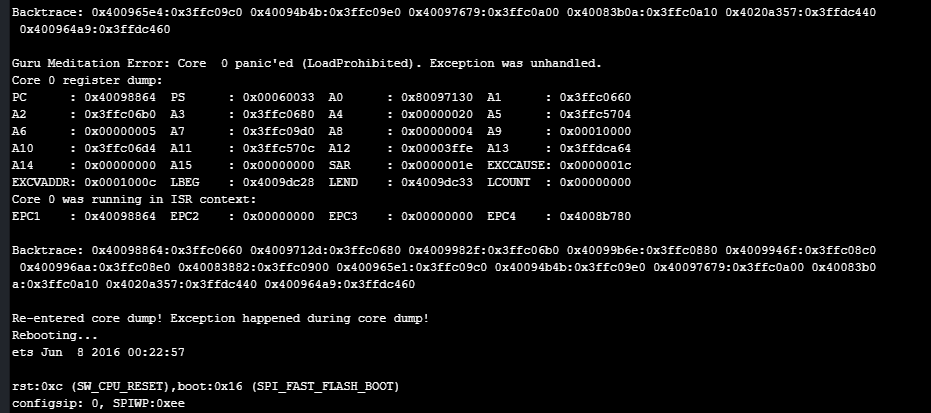
      I had the same issue on LOPY4 boards and seems is related with the watchdog. If the watchdog is started and you do P2+GND (bootloader mode) then press reset... always you got this cycled error. The workaround is to put P2+GND (bootloader mode) and unplug then plug power The issue is reproduced on several boards with LOPY4. [image: 1656139844090-fd87a3a3-94d5-4889-9855-3eab286dec51-image.png]
    • 1
    • 2
    • 3
    • 4
    • 5
    • 14
    • 15
    • 2 / 15