• Current LTE Firmware update process bricks FiPy's

    FiPy
    1
    0 Votes
    1 Posts
    22 Views
    No one has replied
  • valid values for lte = LTE(carrier="xxx")?

    GPy
    10
    0 Votes
    10 Posts
    773 Views
    J
    Hi @rskoniec @robert-hh, I would like to know if is possible to fix it or maybe if there is something wrong, because when I want to determine the proper carrier on my Fipy, I did not get any response, the list is empty. The firmware version is LR5.1.1.0-47510 and it is in application mode. Thank you in advance. >>> from network import LTE >>> lte=LTE() >>> lte.send_at_cmd("AT+SQNCTM=?") '' >>>
  • ImportError: no module named 'pycom'

    Pymakr
    3
    0 Votes
    3 Posts
    24 Views
    R
    Silly me - believing stuff I read on the internet!
  • How to use FFT Algorithm in lopy4?

    Guides
    2
    0 Votes
    2 Posts
    16 Views
    J
    @Yorick-Blom See https://forum.pycom.io/topic/7505/fast-fft-for-iot-application/2
  • No module named requests

    FiPy
    2
    2
    0 Votes
    2 Posts
    12 Views
    J
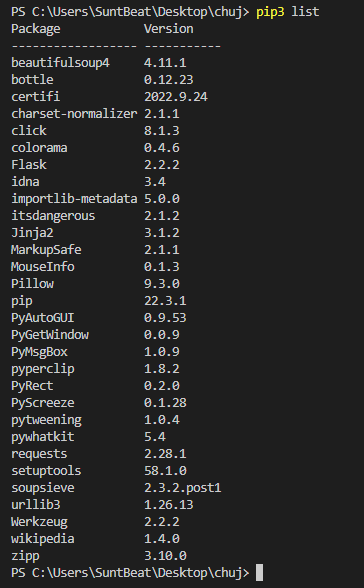
    @Sunt-Beat you need to install modules on the device, not on your computer. You’ll probably need to use the “micro” version of the module, urequests.
  • FiPy - SMS sending.

    Discussion
    2
    1
    0 Votes
    2 Posts
    19 Views
    P
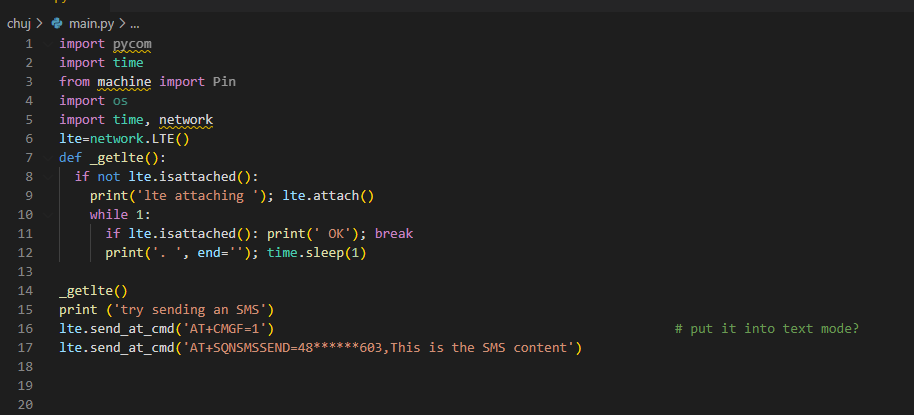
    Hey, adding some code that should get you there and that includes a lot of useful debugging stuff. You'll need to change the apn / band . import time import socket from network import LTE # Connect to Mobile def connect_mobile(settings): lte = LTE() connected = False display.set_mode("Trying: LTE") try: lte.init() print("LTE init success") except: print("LTE init failed") print(lte.ue_coverage()) # Check network coverage (True, is yes) print(lte.send_at_cmd('AT!="fsm"')) print(lte.send_at_cmd("AT")) print(lte.send_at_cmd("ATI1")) print(lte.send_at_cmd("AT+CSMINS?")) print(lte.send_at_cmd("AT+CFUN?")) print(lte.send_at_cmd('ATI+CIMI')) # Request IMSI print(lte.send_at_cmd('ATI+SQNCTM=?')) print("Add band, will be much faster") #lte.attach(band=None, apn="iot.1nce.net") #band : to scan for networks. If no band (or None) is specified, all bands will be scanned. The possible values for the band are: 3, 4, 5, 8, 12, 13, 20 and 28. lte.attach(band=20, apn="iot.1nce.net") # works print("attaching..",end='') while not lte.isattached(): time.sleep(0.25) print('.',end='') print(lte.send_at_cmd('AT!="fsm"')) # get the System FSM print("attached!") # once attached print(lte.send_at_cmd("AT+CSQ")) # Signal quality, returns <ssid> (), <ber> # SSID (received signal strength indication) ## 0: -113dBm or less ## 1: -111 dBm ## 2..30: -109..-53 dBm ## 31: -51 dBm or greater (best) ## 99: not known or not detectable # ber : channel bit error rate in percent ## 0..7: see table ## 9: not known or not detectable lte.connect() print("connecting [##",end='') while not lte.isconnected(): time.sleep(0.25) print('#',end='') print(lte.send_at_cmd('AT!="fsm"')) print("] connected!") print(socket.getaddrinfo('pybytes.pycom.io', 80)) lte.deinit() # Disables LTE modem completely return connected
  • NB-IoT: inconsistent results

    Discussion
    1
    0 Votes
    1 Posts
    16 Views
    No one has replied
  • SPI slave device help

    MicroPython spi
    5
    0 Votes
    5 Posts
    59 Views
    J
    @DualMatic since the chip using 16-bit words you should provide a 2-byte buffer for the data being read.
  • 0.0.8

    Helium Hotspot
    5
    0 Votes
    5 Posts
    104 Views
    W
    can you access the dashboard? I can't seems to get in.
  • 0 Votes
    1 Posts
    18 Views
    No one has replied
  • Hotspot - not registered

    Helium Hotspot
    1
    0 Votes
    1 Posts
    38 Views
    No one has replied
  • Is there a way to use an ethernet board with Fipy?

    FiPy
    1
    0 Votes
    1 Posts
    18 Views
    No one has replied
  • light sleep and uart

    LoPy
    2
    0 Votes
    2 Posts
    18 Views
    robert-hhR
    @Alessandro-Cortese There is no way implemented to stop machine.sleep().
  • L04 Lorawan ABP

    LoPy
    1
    0 Votes
    1 Posts
    13 Views
    No one has replied
  • MicroPython network.WIZNET5K module?

    Firmware
    3
    2 Votes
    3 Posts
    47 Views
    M
    Were you able to find a solution to the problem? i'm the same way
  • 0 Votes
    1 Posts
    16 Views
    No one has replied
  • How to remove pybytes from WiPy

    Pybytes IoT platform
    2
    0 Votes
    2 Posts
    32 Views
    A
    Hello, i think you should use pycom firmware update tool in order to change stack. see the following link https://docs.pycom.io/updatefirmware/device/.
  • Firmware Release v1.20.2.r5

    Announcements & News
    12
    0 Votes
    12 Posts
    160 Views
    robert-hhR
    @Xykon That sounds promising. Good luck.
  • OSError: Network card not available for Wifi (pycom4)

    Issues & Bugs
    3
    0 Votes
    3 Posts
    27 Views
    ?
    Hey, yhea before when i put it in the main.py it took long to connect, and sometimes just wont. Still seems to be the problem when setting up the connection in main.py, but atleast the client works after no problem... EDIT: Because in the boot.py it connects realquick everytime.
  • Google spreadsheet with Micropython

    MicroPython
    2
    0 Votes
    2 Posts
    26 Views
    J
    @Nahian-Mugdho By using the Sheets API maybe?