• LTE M1 with Swisscom SIM

    Discussion fipy lte lte-m apn swisscom
    1
    0 Votes
    1 Posts
    665 Views
    No one has replied
  • LTE custom APN username and password

    FiPy lte apn fipy apnname
    1
    1 Votes
    1 Posts
    449 Views
    No one has replied
  • Import Custom Library

    MicroPython i2c atom library import fipy
    3
    2
    0 Votes
    3 Posts
    830 Views
    B
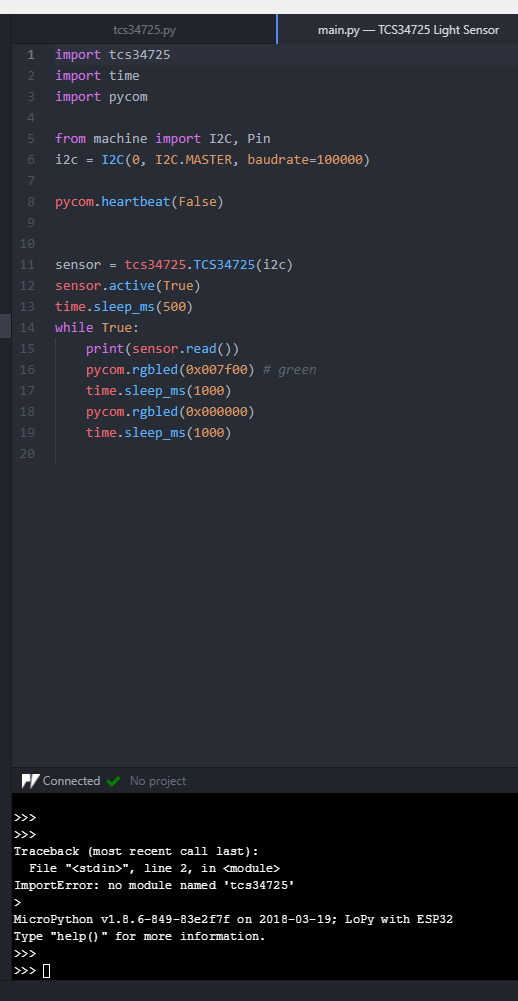
    @dan I understand that and get this error when I flash it, but I would also like it to link in Atom so I can build and run it right away without having to flash it. [image: 1537809779016-2f6c007e-17d2-4496-a1eb-b82c77973113-image.png]
  • AWS Data use

    FiPy fipy aws microsoft azure
    2
    0 Votes
    2 Posts
    549 Views
    P
    Hi, Have you considered a normal socket connection, and simply AES encrypting your data during transmission? You should be able to smash a checksum of the encrypted message down to like 4 bytes, and then include a delimiter sequence to snip the checksum off the datagram. You can use SSL to fetch the initial AES key from your backend, and then use that key in the future over normal network sockets. Sure, you might get MITM, but who cares, if the messages are encrypted and checksummed. Can't help with the AWS stuff, we just push messages to our own backend servers directly.
  • 0 Votes
    11 Posts
    1k Views
    J
    @shp96 That does not seem correct. Your gateway is only listening on channels 48 to 55 and 70... Can you show logs of packets received with the associated channel?
  • LTE_WAKE / GPIO27 Pin Behaviour

    Firmware gpy fipy
    3
    0 Votes
    3 Posts
    699 Views
    A
    Hi, ( @cschloss , @panda ) I think the furthest we can get with the available documentation is using the '+CNMI' command. Unfortunately, it enables an unsolicited result code that we cannot truly listen with the current LTE implementation. Also, a 'hack' using raw UART is not very useful, as the UART interrupt is not implemented... We end up in a pooling loop, just like we would do with lte.send_at_cmd('AT+CMGL="ALL"'). If you would like to see the '+CNMI' feature working, here's a small poc: import machine import utime from machine import UART from network import LTE lte = LTE() # instantiate the LTE object lte.send_at_cmd('AT+CGDCONT=1,"IP","hologram"') # change this to something that works for you lte.attach() # attach the cellular modem to a base station while not lte.isattached(): print('Attaching...') utime.sleep(0.25) print('LTE attached') # configure SMS New Message Indication # Full message (+CMT): lte.send_at_cmd('AT+CNMI=2,2,0,0,0') # OR just notification with memory location (+CMTI): # lte.send_at_cmd('AT+CNMI=2,1,0,0,0') # 'Force' text mode lte.send_at_cmd('AT+CMGF=1') # 'hijack' the modem UART. # The following pins are for FiPy. On GPy you should change to ('P5', 'P98', 'P7', 'P99') uart = UART(1, baudrate=921600, pins=('P20', 'P18', 'P19', 'P17')) print('Waiting for unsolicited result codes...') # Now just send some SMSs and check the output while True: # Ugly, but UART interrupt handler is not an option... if uart.any(): print(uart.read()) utime.sleep(1) Unfortunately, we cannot go very far without access to the modem datasheet and learn how the interrupt behaves under different configurations and usage scenarios. Probably it's something that can only be enabled in the modem's firmware. Sincerely I'm a bit disappointed with Pycom's LTE software stack that is lacking behind its highly capable hardware.
  • Hologram.io vs Verizon ThingSpace

    FiPy lte hologram verizon thingspace fipy
    3
    0 Votes
    3 Posts
    585 Views
    J
    @panda Thanks for the input. My first thought was Hologram due to lower cost to get started. Long term commitment to data plan is another issue which I am not sure of. At this point, I am going to be trying lots of different things to arrive at a configuration that works for me. In a perfect world (lots of time and money) I would try both with two different setups connecting to the same sensor network and using the same code. Since my world is far from perfect, I thought I would ask. Hearing your experience with Hologram helps... functionality is also high on the list, and it seems like it is working good for you.
  • NB-IoT configuration for USA

    FiPy fipy nb-iot nb-iot coverage t-mobile
    1
    0 Votes
    1 Posts
    434 Views
    No one has replied
  • Bluetooth event handling - FiPy

    FiPy fipy bluetooh event handling
    1
    2
    0 Votes
    1 Posts
    418 Views
    No one has replied
  • 0 Votes
    3 Posts
    1k Views
    danD
    Hi @grideagle, Thank you for reporting that, I've reported it to GitBook. The current workaround is to use the "copy" button it the top right corner of the code section.
  • Trouble with deepsleep example

    FiPy fipy deepsleep
    10
    2
    0 Votes
    10 Posts
    1k Views
    robert-hhR
    @Erick-Falcon Why did you post that here? It is not related to the topic.
  • Deep Sleep Wakeup, recording multiple events

    Discussion deepsleep wake fipy
    1
    0 Votes
    1 Posts
    392 Views
    No one has replied
  • Fipy, no FTP, Atom no project, no files on Fipy.

    FiPy fipy atom ftp
    4
    0 Votes
    4 Posts
    864 Views
    danD
    @nickboots Great! I'm glad you sorted it out. The project name label might be related to this issue, you should be still able to upload/run your project, it's just the label that doesn't update. FTP only works with WiFi, if you want to use the serial connection, you can use Pymakr with Atom/VSCode, or rshell.
  • 1 Votes
    2 Posts
    449 Views
    G
    You'll might have issue attaching to the network again, in which case you'll have to deinit and try re-attaching. Probably won't be an issue unless you save some state to nvram. I don't understand the other part fully: Are you using all three commands to deinit the LTE modem? I think you only need lte.deinit() or the other two (although I'm looking for a definite answer to this as we speak). What do you estimate to power consumption difference to be? What power consumption/battery life do you need to achieve?
  • 0 Votes
    6 Posts
    1k Views
    I
    @NickBoots , If you are connecting to an Access point from your pycom device (i.e Wifi in STA mode) disable the wifi on boot option via this command pycom.wifi_on_boot(False) reset board and try again.
  • CAT M1

    FiPy cat m1 lte fipy sim sim fipy
    2
    0 Votes
    2 Posts
    533 Views
    B
    Update: Some more information... I am in the USA, and registered the SIM card on a verizon network that mentioned it was compatible with the FiPY IMEI. Below is a screenshot of some commands. Firmware is 33080, this is old...could this be the issue?, but it seems Pycom is releasing a new modem update fix soon? Do I need to set the APN manually, or is there something I am missing? I have a CATM1 modem with the same kind of SIM card and it gets signal just fine here. [image: 1534859163191-dd2f561e-2edc-4d5e-bedc-133837e0bb1b-image.png]
  • umqtt robust stalls out on FiPy

    FiPy mqtt umqtt fipy errno 104 econnreset
    3
    3
    0 Votes
    3 Posts
    935 Views
    T
    @matt You should consider checking the connection state. ( Various brokers may time the connection out at the other end.) and then possibly explicitly closing the connection and re-connecting. I am using the core of the AWS MQTT package to talk to Losant and had to deal with the connection status and reconnections. That package maintains the connection in a seperate thread and the library doesn't clean up well so it needed some hacking. I have found the robust and simple implementations also needs some tweaking to be reliable on ESP8266 so it doesn't surprise me. You may even find it makes sense to disconnect after sending a message and then reconnecting later. Have a look at what the default timouts and the inactivity timeouts are set for the MQTT service you are talking to,